
Review Mode
Review Mode provides AI-powered code reviews analyzing security, performance, best practices, and potential bugs. Get detailed feedback before committing or creating PRs.
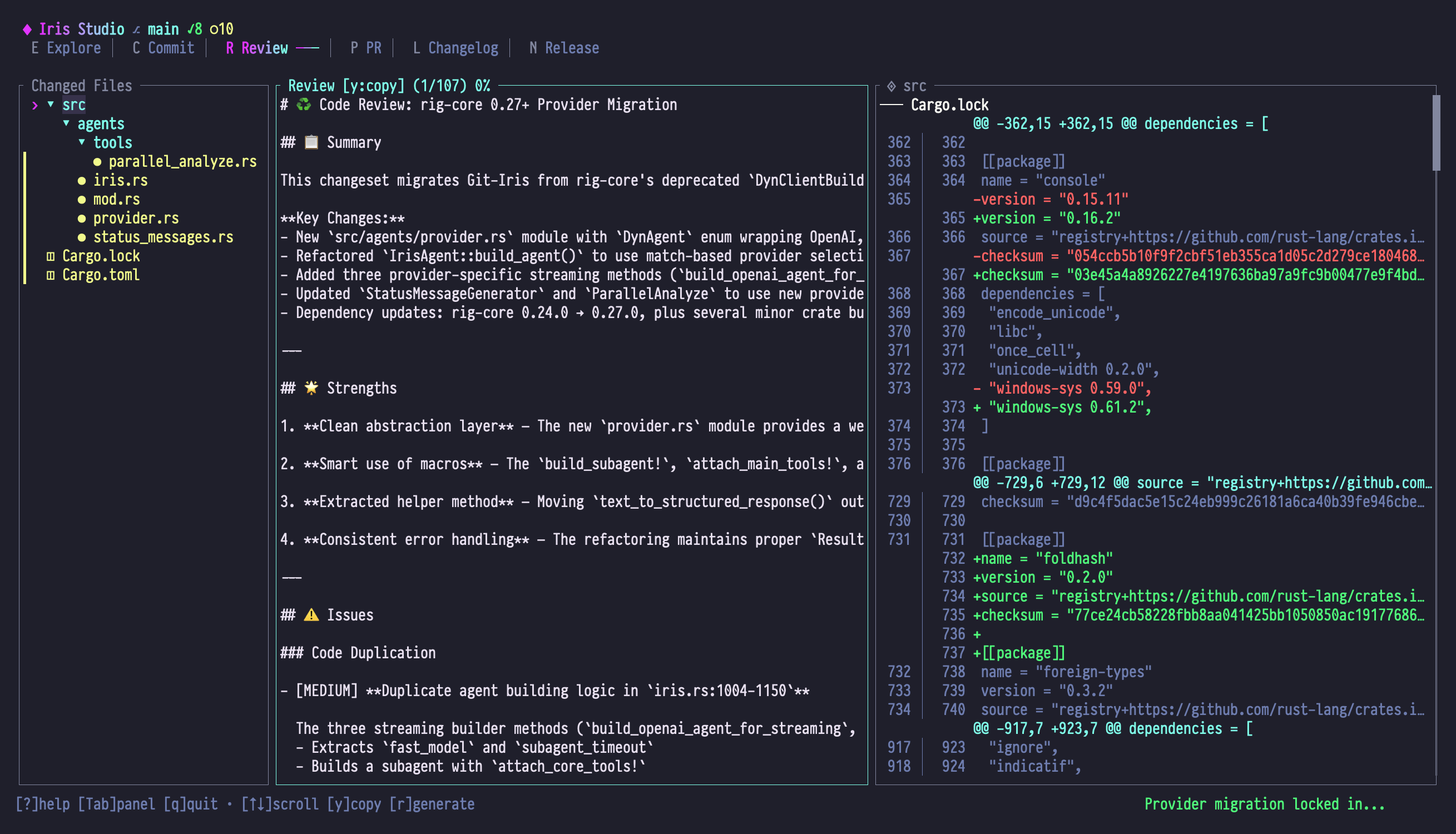
When to Use Review Mode
- Pre-commit quality checks: Review changes before committing
- PR preparation: Catch issues before reviewers see them
- Learning best practices: Understand why certain patterns are recommended
- Security audit: Identify potential vulnerabilities
- Performance analysis: Find bottlenecks and inefficiencies
Panel Layout
| Panel | Content |
|---|---|
| Left | Changed Files tree of files in the selected ref range |
| Center | Structured markdown review: summary, coverage, and findings by severity |
| Right | Unified diff view with syntax highlighting and hunk navigation |
Left Panel: Changed Files
A FileTree titled Changed Files, listing each path touched between from and to. Ref selection itself happens in a modal (press f or t), not as inline UI in this panel.
Center Panel: Review Output
Iris emits a structured Review (see src/types/review.rs), then renders it as markdown. Each finding carries a severity (critical, high, medium, low), a category (security, performance, error handling, complexity, abstraction, duplication, testing, style, API contract, concurrency, documentation, or other), and a confidence score from 0–100. The center panel scrolls through this rendered markdown.
Right Panel: Diff View
- Unified diff for context
- Syntax-highlighted changes
- Hunk navigation
- Multi-file diff
Essential Keybindings
File List (Left Panel)
The f/t chords are handled when the left panel has focus — they open a ref selector modal scoped to Review's from/to refs.
| Key | Action |
|---|---|
| j / ↓ | Select next file |
| k / ↑ | Select previous file |
| h / ← | Collapse directory |
| l / → | Expand directory |
| Enter | Load file diff (focus right panel) |
| f | Open "from" ref selector modal |
| t | Open "to" ref selector modal |
| r | Generate review |
| g / Home | Jump to first file |
| G / End | Jump to last file |
Review Output (Center Panel)
| Key | Action |
|---|---|
| j / ↓ | Scroll down |
| k / ↑ | Scroll up |
| Ctrl+d / PgDn | Page down |
| Ctrl+u / PgUp | Page up |
| g / Home | Jump to top |
| G / End | Jump to bottom |
| r | Regenerate review (spawns a fresh AgentTask::Review for the current from/to refs — there is no incremental memory between runs) |
| Shift+R | Reset (clear review) |
| y | Copy review to clipboard |
Diff View (Right Panel)
| Key | Action |
|---|---|
| j / ↓ | Scroll down |
| k / ↑ | Scroll up |
| [ | Jump to previous hunk |
| ] | Jump to next hunk |
| n | Jump to next file |
| p | Jump to previous file |
| Ctrl+d / PgDn | Page down |
| Ctrl+u / PgUp | Page up |
Ref Selection
Press f or t to select from/to refs. The modal displays a filterable list of branches and tags with type-to-search functionality.
Default Refs
- From: repository primary branch on feature branches On the primary branch itself, Review falls back to
HEAD~1 - To:
HEAD(current state)
Common Ranges
| From | To | Reviews |
|---|---|---|
<default-branch> | HEAD | All changes on current branch |
v1.0.0 | v1.1.0 | Changes between releases |
abc123f | HEAD | Changes since specific commit |
origin/<default-branch> | HEAD | Local changes not pushed |
Review Dimensions
Iris analyzes code across multiple dimensions:
🔒 Security
- SQL injection risks
- XSS vulnerabilities
- Authentication/authorization issues
- Cryptographic weaknesses
- Input validation gaps
- Secret exposure
⚡ Performance
- Algorithmic complexity (O(n²) loops, etc.)
- Memory leaks
- Inefficient queries
- Unnecessary allocations
- Hot path optimizations
- Caching opportunities
✨ Best Practices
- Code organization
- Naming conventions
- Error handling patterns
- Testing coverage
- Documentation quality
- SOLID principles
🐛 Potential Bugs
- Null/undefined dereferencing
- Off-by-one errors
- Race conditions
- Resource leaks
- Type mismatches
- Edge case handling
🧹 Code Quality
- Duplication (DRY violations)
- Complexity (cyclomatic, cognitive)
- Readability
- Maintainability
- Testability
📚 Documentation
- Missing docstrings
- Outdated comments
- Unclear naming
- API documentation
- README accuracy
Review Output Format
Iris emits a structured Review (defined in src/types/review.rs) and renders it as markdown. Top-level sections always follow this order:
# Code Review## Summary— the model's narrative paragraph## Review Coverage— optional metadata: overall risk level, strategy, specialist passes, coverage notes## Findings— a stats line followed by findings grouped under### CRITICAL,### HIGH,### MEDIUM,### LOW
Findings below the default confidence threshold (70%) are filtered out before display, so the stats line reports only the visible findings. When nothing remains, the section reads "No blocking issues found." instead of listing categories.
Each finding renders as:
- [SEVERITY] **title in `file:line`**
  Category: <category>. Confidence: NN%.
  <body paragraph explaining the issue>
  **Fix**: <optional suggested fix>
  Evidence: file.rs:12, file.rs:30 (optional notes)
Example
# Code Review

## Summary

Reviewed 3 files with 145 additions and 32 deletions. The diff is mostly self-contained, but two changes need attention before merge.

## Review Coverage

Risk: high

Strategy: focused review of input validation and hot-path performance, with a security specialist pass on the message editor.

Specialist passes:
- security
- performance

## Findings

Reviewed 3 file(s). Found 2 issue(s): 0 critical, 1 high, 1 medium, 0 low.

### HIGH

- [HIGH] **Unvalidated input from message editor in `src/handlers/commit.rs:45`**
  Category: security. Confidence: 88%.
  The handler trusts every byte from the editor and forwards it straight into the commit pipeline. A pathological payload could exceed downstream buffers.
  **Fix**: Cap length and sanitize control characters before dispatch.
  Evidence: src/handlers/commit.rs:45, src/handlers/commit.rs:72

### MEDIUM

- [MEDIUM] **O(n²) lookup in commit indexing in `src/studio/state.rs:123-141`**
  Category: performance. Confidence: 76%.
  The nested loop scans every file for every commit, which scales poorly on large repos.
  **Fix**: Build a `HashMap<CommitId, Vec<FileId>>` once, then look up in O(1).
Severity Indicators
The terminal renderer styles each severity badge instead of using check/warn/cross glyphs:
[CRITICAL]and[HIGH]— error color, bold (the most urgent issues)[MEDIUM]— warning color, bold[LOW]— coral, bold
Confidence Gating
The default cutoff is 70%, defined as DEFAULT_MIN_FINDING_CONFIDENCE in src/types/review.rs. Anything Iris is less than 70% sure about is dropped from the rendered view and from the stats counts — they exist in the structured payload but never reach the markdown the user sees.
Workflow Examples
Example 1: Pre-Commit Review
Goal: Check changes before committing
- Make code changes
- Switch to Review mode (Shift+R)
- Default refs are
primary-branch..HEADon feature branches On the primary branch, Review falls back toHEAD~1..HEAD - Press r to generate review
- Read the summary and walk the findings from CRITICAL down to LOW
- Press / to chat: "Explain the O(n²) issue you found"
- Fix issues in your editor
- Press r to review again
- When the findings list is empty (or shows "No blocking issues found."), switch to Commit mode (Shift+C)
Example 2: PR Preparation
Goal: Get feedback before creating pull request
- Finish feature branch
- Switch to Review mode
- Press f to select from ref:
origin/<default-branch> - Press t to select to ref:
HEAD - Press r to generate review
- Address every
[CRITICAL]and[HIGH]finding, then triage the[MEDIUM]and[LOW]ones - Press y to copy review to clipboard
- Paste into PR description as "Self-Review" section
Example 3: Release Audit
Goal: Review all changes between versions
- Open Review mode
- Press f → select
v1.0.0 - Press t → select
v1.1.0 - Press r to generate review
- Focus on Security dimension (scroll to section)
- Document any breaking changes found
- Copy review with y
- Use as release audit documentation
Example 4: Learning from Reviews
Goal: Understand best practices by asking Iris
- Generate review (r)
- See warning: "Consider using iterators instead of for loops"
- Press / to open chat
- Ask: "Show me how to rewrite that loop with iterators"
- Iris provides example code
- Press Shift+E to switch to Explore mode
- Navigate to the file
- Press w on the loop to understand its history
- Refactor based on learning
Example 5: Security-Focused Review
Goal: Audit for security issues only
- Generate review
- Scan the Findings section for entries whose
Category:line readssecurity - For each one:
- Note the file and line range in the finding title
- Press Tab to focus the diff panel
- Navigate to that line with j/k
- Press / to ask: "How would you exploit this?"
- Fix vulnerabilities
- Press r to regenerate the review against the updated tree
Special Features
Context-Aware Analysis
Iris reads project documentation to understand:
- Architecture patterns: From CLAUDE.md
- Coding standards: From README or CONTRIBUTING.md
- Agent behavior: From AGENTS.md
Reviews are customized to your project's standards.
Diff-Integrated Review
Line number references in review correspond to diff view:
Review says:        Diff shows:
⚠️ Line 45          @@ -40,6 +40,10 @@
                     42  pub fn new() {
                     43    Self {
                     44      mode: Auto,
                     45      editing: false,  ← Line 45
Press Tab to jump between review and diff.
Chat Integration
Ask follow-up questions about review findings:
You: Why is the O(n²) loop a problem here?

Iris: The nested loop in state.rs processes each commit
      against all files. For 100 commits × 500 files, that's
      50,000 iterations.

      With indexed lookup:
      1. Build HashMap<CommitId, Vec<FileId>>  // O(n)
      2. Look up files for each commit         // O(1)
      Total: O(n) instead of O(n²)

You: Show me the indexed version

Iris: [Provides code example]
Re-running a Review
Each press of r spawns a brand-new AgentTask::Review for the current from/to refs (see src/studio/handlers/mod.rs and handlers/review.rs). There is no cross-run memory: Iris does not remember that you fixed an earlier issue, and there are no "quick" vs "deep" review modes — every run is a full re-analysis. To narrow the scope, change the refs (f/t) before regenerating.
Tips & Tricks
1. Review Before Committing
Make it a habit:
- Write code
- Shift+R → Review
- Fix issues
- Shift+C → Commit
2. Use Chat for Explanations
Don't guess what warnings mean:
- See ⚠️ → Press / → Ask "Explain this warning"
- Iris provides detailed context and examples
3. Compare with Upstream
Before merging to your primary branch:
- From:
origin/<default-branch> - To:
HEAD - Reviews what will land in production
4. Save Reviews for PRs
Copy review (y) and paste into:
- PR description
- Commit message (for complex changes)
- Team wiki (as examples)
5. Filter by Category in Your Head
Findings carry an explicit Category: line (security, performance, error handling, etc.). Scan the rendered output and ignore categories that aren't your current focus — useful when you only have time to triage security or performance issues.
6. Iterative Improvement
Don't try to fix everything at once:
- First pass: clear all
[CRITICAL]and[HIGH]findings - Second pass: address
[MEDIUM] - Third pass: polish
[LOW]items where it's worth the effort
Troubleshooting
Review is empty
Symptom: Center panel shows "No review generated"
Fix:
- Check that from/to refs are different
- Ensure there are actual changes in range
- Press r to manually trigger
- Check status bar for errors
Review takes too long
Symptom: Iris status shows "Thinking..." for >1 minute
Cause: Very large diff (1000+ lines)
Fix:
- Narrow the ref range (fewer commits)
- Review files individually (select in left panel)
- Use chat instead: "Review the security of iris.rs"
Line numbers don't match
Symptom: Review mentions line 45, but diff shows line 50
Cause: Line numbers are from after changes (in "to" ref)
Fix: Navigate diff to find context around that area.
No security findings but I'm suspicious
Symptom: The findings section shows "No blocking issues found." (or no security category entries) but you're not convinced.
Cause: Confidence gating may have hidden a borderline finding (anything below 70% is filtered before display).
Fix:
- Press / to open chat
- Ask specific questions: "Could this be vulnerable to XSS?"
- Request focused analysis: "Review line 45 for SQL injection"
Next Steps
- Use review findings to improve Commit Messages
- Combine with Explore Mode to understand flagged code
- Generate PR Descriptions that include review summary
- Learn Chat for detailed review discussions