
PR Mode
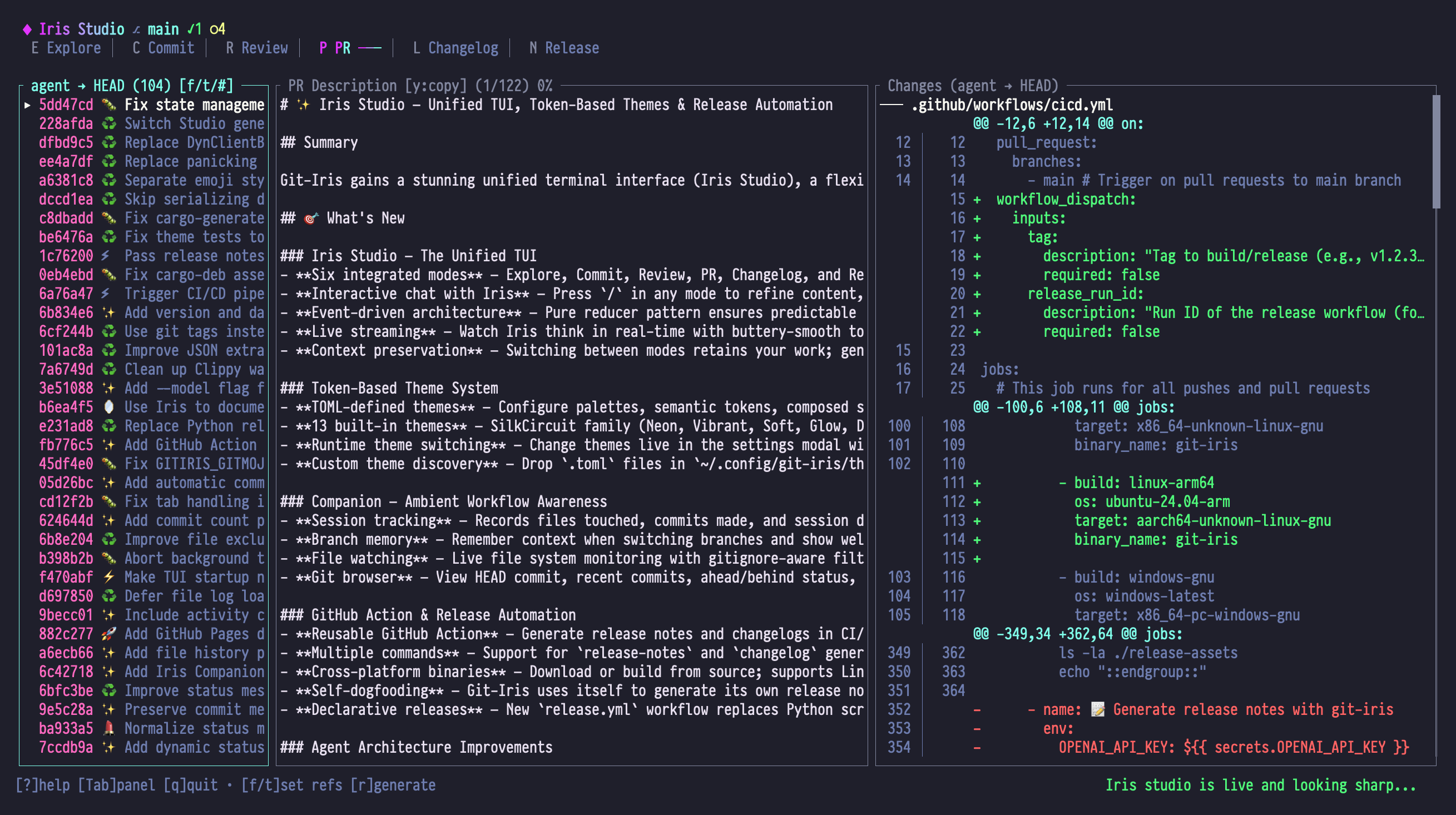
PR Mode generates pull request descriptions from commit history and diffs. Get structured markdown output ready to paste into GitHub, GitLab, or any PR system.
When to Use PR Mode
- Creating pull requests: Generate detailed PR descriptions
- Documenting feature branches: Explain what changed and why
- Code review preparation: Give reviewers context before they dive in
- Release preparation: Document all changes for stakeholders
Panel Layout
| Panel | Content |
|---|---|
| Left | Commits in range with hash, title, and ref range summary |
| Center | Markdown-formatted PR description ready to copy/paste |
| Right | Aggregated diff summary with file changes and statistics |
Left Panel: Commit List
- All commits in range (from..to)
- Commit hash (short)
- Commit title
- Selection indicator
- Ref range summary
Center Panel: PR Description
- Markdown-formatted output
- Summary section
- Detailed changes
- Technical details
- Testing guidance
- Ready to copy/paste
Right Panel: Diff Summary
- Aggregated diff across all commits
- File change list
- Addition/deletion counts
- Hunk navigation
Essential Keybindings
Commit List (Left Panel)
| Key | Action |
|---|---|
| j / ↓ | Select next commit |
| k / ↑ | Select previous commit |
| g / Home | Jump to first commit |
| G / End | Jump to last commit |
| f | Select "from" ref (base branch) |
| t | Select "to" ref (target branch) |
| # | Quick "last N commits" picker — opens a CommitCount modal that sets the from-ref to HEAD~N for fast PR descriptions over the last few commits |
| r | Generate PR description |
PR Description (Center Panel)
| Key | Action |
|---|---|
| j / ↓ | Scroll down |
| k / ↑ | Scroll up |
| Ctrl+d / PgDn | Page down |
| Ctrl+u / PgUp | Page up |
| g / Home | Jump to top |
| G / End | Jump to bottom |
| r | Regenerate PR description |
| Shift+R | Reset (clear description) |
| y | Copy description to clipboard |
Diff View (Right Panel)
| Key | Action |
|---|---|
| j / ↓ | Scroll down |
| k / ↑ | Scroll up |
| [ | Jump to previous hunk |
| ] | Jump to next hunk |
| n | Jump to next file |
| p | Jump to previous file |
Ref Selection
Press f (from) or t (to) to select base and target branches:
Common Workflows
| Scenario | From | To | Description |
|---|---|---|---|
| Feature branch | main | HEAD | All feature work |
| Release PR | v1.0.0 | v1.1.0 | Changes for release |
| Hotfix | main | hotfix/bug-123 | Urgent fix |
| Compare branches | develop | feature/xyz | Branch differences |
From Ref (Base Branch)
Usually:
mainormaster- Previous release tag (
v1.0.0) - Develop branch (
develop)
This is where you're merging into.
To Ref (Target Branch)
Usually:
HEAD(current branch)- Feature branch name
- Release tag
This is what you're merging.
PR Description Format
Iris generates structured markdown:
# [Title from commits]

## Summary

[High-level overview of changes - 2-3 sentences]

## Changes

- [Bullet list of key changes]
- [Organized by feature/area]
- [User-facing impacts]

## Technical Details

- [Implementation specifics]
- [Architecture changes]
- [Dependencies added/updated]
- [Performance considerations]

## Testing

- [ ] Unit tests added/updated
- [ ] Integration tests pass
- [ ] Manual testing completed
- [ ] Edge cases covered

## Migration Guide

[If breaking changes]

- What changed
- How to update code
- Examples

## Screenshots

[If UI changes - prompts you to add]

## Related Issues

- Closes #123
- Related to #456
Example Output
# Add Emoji Selector to Commit UI

## Summary

Introduces a full-featured emoji selection interface for commit
messages, replacing the boolean gitmoji flag with a three-state
system (None/Auto/Custom). Users can now manually override emoji
selection with a filterable modal.

## Changes

- Added `EmojiSelector` modal component with type-to-filter
- Implemented `EmojiMode` enum to replace `use_gitmoji` boolean
- New keybindings: `g` to open selector, `Shift+E` to quick-toggle
- Migrated config handling for backward compatibility

## Technical Details

- New `Modal::EmojiSelector` variant in state.rs
- Emoji list sourced from gitmoji.rs (100+ standard emojis)
- Filterable UI using fuzzy matching on emoji name/description
- State synced between emoji mode and legacy gitmoji flag

## Testing

- [x] Unit tests for EmojiMode enum variants
- [x] Manual testing of selector modal
- [x] Verified keyboard navigation (j/k, Enter, Esc)
- [x] Config migration tested with legacy files

## Migration Guide

**Breaking Change**: `use_gitmoji` config is deprecated

Before:

```toml
use_gitmoji = true
```
After:
# Not needed - defaults to Auto mode
# Or explicitly:
emoji_mode = "auto"  # or "none" or "custom:<emoji>"
Existing configs are auto-migrated on first run.
Related Issues
- Closes #789 "Allow manual emoji selection"
- Related to #234 "Improve commit UX"
## Workflow Examples

### Example 1: Standard Feature PR

**Goal**: Create PR for feature branch

1. Finish feature work on branch `feature/emoji-selector`
2. Switch to PR mode (<kbd>Shift+P</kbd>)
3. Default refs are `primary-branch..HEAD` (perfect!)
4. Press <kbd>r</kbd> to generate description
5. Review output in center panel
6. Press <kbd>y</kbd> to copy to clipboard
7. Open GitHub, create PR, paste description

### Example 2: Custom Ref Range

**Goal**: Create PR comparing two branches

1. Open PR mode
2. Press <kbd>f</kbd> → select `develop` as base
3. Press <kbd>t</kbd> → select `feature/xyz` as target
4. Press <kbd>r</kbd> to generate
5. Review commits in left panel (shows all commits in range)
6. Copy description (<kbd>y</kbd>)

### Example 3: Iterative Refinement

**Goal**: Refine PR description with chat

1. Generate initial description (<kbd>r</kbd>)
2. Press <kbd>/</kbd> to open chat
3. Type: "Make the summary more technical"
4. Iris updates description
5. Press <kbd>Esc</kbd>, review
6. Press <kbd>/</kbd> again: "Add a breaking changes section"
7. Iris adds migration guide
8. Copy final version (<kbd>y</kbd>)

### Example 4: Release PR

**Goal**: Document all changes for v1.1.0 release

1. Open PR mode
2. Press <kbd>f</kbd> → select `v1.0.0` (previous release)
3. Press <kbd>t</kbd> → select `v1.1.0` (new release)
4. Press <kbd>r</kbd> to generate
5. Left panel shows all commits since v1.0.0
6. Description includes full change summary
7. Use as release PR description

### Example 5: Adding Context After Generation

**Goal**: Include reviewer guidance

1. Generate PR description
2. Press <kbd>/</kbd> to chat
3. Type: "Add a 'Review Focus' section highlighting security changes"
4. Iris adds section:
   ```markdown
   ## Review Focus
   Please pay special attention to:
   - Input validation in src/handlers/commit.rs
- Authentication flow changes in src/auth/- Copy and use
Special Features
The behaviors below are prompt-driven, not coded features. The PR mode output type is a thin markdown wrapper (
MarkdownPullRequest = { content: String }insrc/types/pr.rs), so what you actually get is whatever the LLM decides to emit given the commit range and the capability prompt atsrc/agents/capabilities/pr.toml. Treat these as guidelines Iris tries to follow, not deterministic guarantees.
Commit Analysis
Iris is prompted to read all commits in the range to:
- Extract common themes
- Identify breaking changes
- Detect related work
- Build coherent narrative
Intelligent Grouping
The prompt encourages grouping changes by:
- Feature: Related functionality
- Type: Bug fixes, features, refactors
- Impact: User-facing vs. internal
Breaking Change Detection
When the diff looks like it changes a public surface, Iris is encouraged to call it out:
- API changes (function signature modifications)
- Config format changes
- Removed features
- Behavioral changes
And to generate migration guidance.
Test Plan Generation
Based on changes, Iris will often suggest:
- Unit test requirements
- Integration test scenarios
- Manual testing steps
- Edge cases to verify
These appear only when the model judges them useful — the test-plan section is not always present.
Chat Integration
Use chat to refine PR descriptions:
Add Sections
You: Add a "Performance Impact" section

Iris: Added:
      ## Performance Impact
      - EmojiSelector modal lazy-loads gitmoji list
      - No performance impact on hot paths
      - Modal render time: <10ms
Change Tone
You: Make it less technical, more user-focused

Iris: Updated summary to focus on user benefits:
      "Users can now choose custom emojis for commit messages,
       making it easier to visually categorize changes at a glance."
Add Context
You: Explain why we chose an enum over a boolean

Iris: Added to Technical Details:
      The EmojiMode enum (vs. boolean) enables future extensibility:
      - Current: None, Auto, Custom
      - Future: Team-specific emoji sets, per-repo defaults
Markdown Features
PR descriptions support rich markdown:
- Headers (
#,##,###) - Lists (bulleted and numbered)
- Code blocks with syntax highlighting
- Checkboxes (
- [ ]for task lists) - Links to issues (
#123,Closes #456) - Bold, italic,
inline code - Blockquotes for callouts
Copy-paste directly into GitHub/GitLab.
Tips & Tricks
1. Generate Early, Refine Later
Don't wait until PR is perfect:
- Commit a few times
- Generate PR description (r)
- See what story emerges
- Refactor code if story isn't cohesive
2. Use Chat for Stakeholder Versions
Different audiences need different descriptions:
- Engineers: Press r (default technical version)
- Product: Press / → "Rewrite for non-technical audience"
- Support: Press / → "Focus on user-facing changes"
3. Combine with Review Mode
- Shift+R → Review mode, generate review
- y to copy review
- Shift+P → PR mode, generate description
- / → Chat: "Add a 'Self-Review' section with: [paste review]"
4. Track Related Issues
Mention issue numbers in commits:
git commit -m "Add emoji selector (fixes #789)"Iris extracts these and adds to "Related Issues" section automatically.
5. Screenshot Placeholders
When the diff looks like a UI change, the prompt nudges Iris to add something like:
## Screenshots

[TODO: Add before/after screenshots]
This is a prompt suggestion rather than guaranteed output — if Iris doesn't add it and you want it, ask in chat: "Add a Screenshots placeholder."
6. Save Descriptions
Copy description (y) and save to file:
# Outside Studio
pbpaste > pr-description.md  # macOS
xclip -o > pr-description.md  # Linux
Useful for complex PRs that need offline editing.
Troubleshooting
No commits in list
Symptom: Left panel shows "0 commits"
Cause: From and To refs are the same
Fix:
- Press f to select different from ref
- Or press t to select different to ref
- Ensure refs actually differ (not both pointing to
main)
Description is too short
Symptom: Generated description is only 2-3 lines
Cause: Very few or very small commits in range
Fix:
- Verify commit range with j/k in left panel
- Add more commits if needed
- Use chat to expand: "Add more detail about implementation"
Description mentions wrong base branch
Symptom: Description says "Merging into develop" but you want main
Cause: Wrong "from" ref selected
Fix:
- Press f to open ref selector
- Select correct base branch
- Press r to regenerate
Too much detail
Symptom: Description is 1000+ lines
Cause: Very large PR with many commits
Fix:
- Press / to chat: "Summarize in 200 words or less"
- Or break PR into smaller chunks
- Use Changelog mode instead for release notes
Next Steps
- Learn Changelog Mode for structured release notes
- Use Review Mode to audit before PR creation
- Master Chat for description refinement
- See Commit Mode for better commit messages (= better PRs)