
Changelog Mode
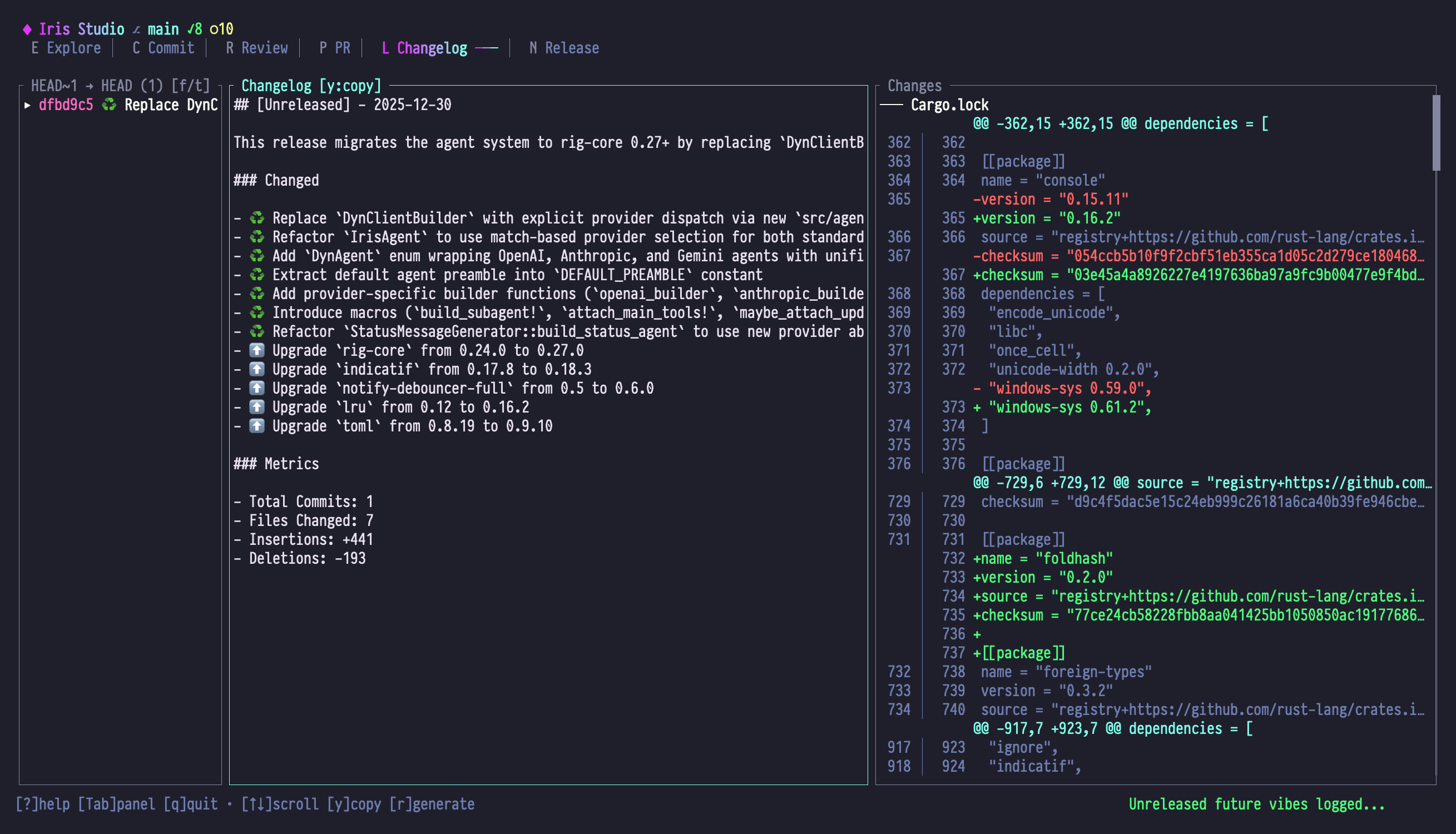
Changelog Mode generates structured changelogs following the Keep a Changelog format. Organize commits into categories (Added, Changed, Fixed, etc.) for clear release documentation.
When to Use Changelog Mode
- Release preparation: Document changes between versions
- Maintain CHANGELOG.md: Keep structured change history
- Communicate with users: Explain what's new, changed, or fixed
- Version planning: See what's accumulated since last release
Panel Layout
| Panel | Content |
|---|---|
| Left | Flat commit list for the selected range (no directory tree) |
| Center | Keep a Changelog format output with categorized changes |
| Right | Aggregated diff summary with file statistics and hunk navigation |
Left Panel: Commit List
The left panel is a simple, flat list — not a directory tree. The title shows from → to (count) [f/t], with the count of commits in range and a reminder of the ref-selector keys. Each row renders as:
▸marker for the currently selected commit (other rows use two spaces of padding)- Short commit hash in coral
- The commit message (truncated to fit)
There is no separate "version tags" line — tags only appear in the title via the from/to refs you pick with f/t. The empty state prompts: "No commits to show — Press 'f' for from ref, 't' for to ref."
Center Panel: Changelog Output
- Keep a Changelog format
- Categorized changes (Added, Changed, Fixed, etc.)
- Markdown-formatted
- Version headers with dates
- Links to commits/PRs (if configured)
Right Panel: Diff Summary
- Aggregated diff for context
- File change statistics
- Hunk navigation
Essential Keybindings
Commit List (Left Panel)
| Key | Action |
|---|---|
| j / ↓ | Select next commit |
| k / ↑ | Select previous commit |
| g / Home | Jump to first commit |
| G / End | Jump to last commit |
| f | Select "from" version/tag |
| t | Select "to" version/tag |
| r | Generate changelog |
Changelog Output (Center Panel)
| Key | Action |
|---|---|
| j / ↓ | Scroll down |
| k / ↑ | Scroll up |
| Ctrl+d / PgDn | Page down |
| Ctrl+u / PgUp | Page up |
| g / Home | Jump to top |
| G / End | Jump to bottom |
| r | Regenerate changelog |
| Shift+R | Reset (clear changelog) |
| y | Copy changelog to clipboard |
Diff View (Right Panel)
| Key | Action |
|---|---|
| j / ↓ | Scroll down |
| k / ↑ | Scroll up |
| [ | Jump to previous hunk |
| ] | Jump to next hunk |
| n | Jump to next file |
| p | Jump to previous file |
Keep a Changelog Format
Iris generates changelogs following the Keep a Changelog standard:
# Changelog

All notable changes to this project will be documented in this file.

The format is based on [Keep a Changelog](https://keepachangelog.com/en/1.0.0/),
and this project adheres to [Semantic Versioning](https://semver.org/spec/v2.0.0.html).

## [Unreleased]

## [1.1.0] - 2024-01-28

### Added

- Emoji selector modal for custom commit emoji selection
- EmojiMode enum to replace boolean gitmoji flag
- Quick toggle keybinding (Shift+E) for None/Auto modes
- Preset selector for commit message styles

### Changed

- Refactored commit mode to use unified message editor
- Improved file tree navigation with keyboard shortcuts
- Updated theme system to support SilkCircuit variants

### Fixed

- File selection sync between tree and diff views
- Scroll position persistence when switching modes
- Emoji display in commit message preview

### Deprecated

- `use_gitmoji` config option (use `emoji_mode` instead)

## [1.0.0] - 2024-01-15

### Added

- Initial release
- Studio TUI with six modes
- AI-powered commit message generation
- Semantic code exploration with blame
Categories
Added
New features or capabilities
Examples:
- New commands
- New modes
- New keybindings
- New UI components
Changed
Changes to existing functionality
Examples:
- Improved algorithms
- Refactored code
- Updated dependencies
- Modified behavior
Deprecated
Features marked for future removal
Examples:
- Config options being phased out
- Old API methods
- Legacy command syntax
Removed
Features removed in this version
Examples:
- Deleted deprecated code
- Removed old APIs
- Dropped support for old versions
Fixed
Bug fixes
Examples:
- Crashes
- Incorrect behavior
- UI glitches
- Performance issues
Security
Security vulnerability fixes
Examples:
- CVE patches
- Authentication fixes
- Input validation improvements
Ref Selection
Press f (from) or t (to) to select version tags:
Common Workflows
| Scenario | From | To | Description |
|---|---|---|---|
| Next release | v1.0.0 | HEAD | Changes since last release |
| Between releases | v1.0.0 | v1.1.0 | Specific version diff |
| Unreleased | Latest tag | HEAD | What's coming next |
| Major version | v1.0.0 | v2.0.0 | Breaking changes |
Version Tag Format
Supports:
- Semantic versioning:
v1.2.3 - Without 'v':
1.2.3 - Pre-release:
v1.2.3-beta.1 - Build metadata:
v1.2.3+20240128
Workflow Examples
Example 1: Prepare Release Changelog
Goal: Generate changelog for v1.1.0 release
- Tag current HEAD:
git tag v1.1.0 - Switch to Changelog mode (Shift+L)
- Press f → select
v1.0.0(previous release) - Press t → select
v1.1.0(new release) - Press r to generate changelog
- Review categorization in center panel
- Press y to copy
- Append to CHANGELOG.md
Example 2: Preview Unreleased Changes
Goal: See what's accumulated since last release
- Open Changelog mode
- Press f → select latest tag (e.g.,
v1.0.0) - Press t → leave as
HEAD - Press r to generate
- Section shows:
## [Unreleased] - Review what's ready for next release
Example 3: Maintaining CHANGELOG.md
Goal: Update existing CHANGELOG.md with new version
- Generate changelog for new version
- Press y to copy
- Outside Studio: edit CHANGELOG.md
- Paste new version section at top (below
[Unreleased]) - Move previous
[Unreleased]items to new version section - Commit updated CHANGELOG.md
Example 4: Refining Categories
Goal: Adjust categorization with chat
- Generate initial changelog
- See commit "Refactor emoji handling" in "Changed"
- Press / to chat: "Move 'Refactor emoji handling' to 'Added' since it adds new functionality"
- Iris recategorizes and updates output
- Review and copy
Example 5: Multiple Versions
Goal: Document changes across several releases
- Generate v1.0.0..v1.1.0
- Copy output (y)
- Press f → select
v1.1.0 - Press t → select
v1.2.0 - Press r to generate next version
- Combine both outputs in CHANGELOG.md
Categorization Logic
Iris uses commit analysis to categorize:
How Commits Are Categorized
Added:
- Conventional commits:
feat:,feature: - Keywords: "add", "introduce", "implement", "create"
- Emoji: ✨ (sparkles), 🎉 (tada)
Changed:
- Conventional commits:
refactor:,perf:,improve: - Keywords: "update", "change", "improve", "refactor"
- Emoji: ♻️ (recycle), ⚡ (zap), 🎨 (art)
Fixed:
- Conventional commits:
fix:,bugfix: - Keywords: "fix", "resolve", "correct", "patch"
- Emoji: 🐛 (bug), 🚑 (ambulance)
Deprecated:
- Keywords: "deprecate", "obsolete"
- Emoji: 🗑️ (wastebasket)
Removed:
- Conventional commits:
remove:,delete: - Keywords: "remove", "delete", "drop"
- Emoji: 🔥 (fire), ➖ (minus)
Security:
- Conventional commits:
security: - Keywords: "security", "vulnerability", "CVE"
- Emoji: 🔒 (lock), 🔐 (closed lock)
Override Categorization
Use chat to adjust:
You: Move "Update dependencies" from Changed to Security

Iris: Recategorized:
      ### Security
      - Update dependencies (addresses CVE-2024-1234)

      (Removed from Changed section)
Special Features
The behaviors below are prompt suggestions, not coded features. The output type for changelogs is a thin markdown wrapper (
MarkdownChangelog = { content: String }insrc/types/changelog.rs), so the structure and content come from whatever the LLM emits while followingsrc/agents/capabilities/changelog.toml. Iris usually honors these conventions — but they aren't guaranteed by the type system, and you can always nudge in chat if something is missing.
Unreleased Section
When "to" ref is HEAD (not a tag):
## [Unreleased]

### Added

- Feature X (in progress)
- Feature Y (completed)

### Changed

- Refactored Z
Indicates changes not yet in a tagged release.
Version Links
If git remote is configured, Iris adds comparison links:
## [1.1.0] - 2024-01-28

...

[Unreleased]: https://github.com/user/repo/compare/v1.1.0...HEAD
[1.1.0]: https://github.com/user/repo/compare/v1.0.0...v1.1.0
Enables clicking to view full diff on GitHub.
Breaking Changes Callout
Major version bumps (v1.x.x → v2.0.0) get special treatment:
## [2.0.0] - 2024-02-01

### ⚠️ BREAKING CHANGES

- Removed legacy config format
- Changed API signatures in ...

### Added

...
Empty Category Suppression
Categories with no changes are omitted:
## [1.1.0] - 2024-01-28

### Added

- ...

### Fixed

- ...

<!-- No "Changed", "Deprecated", "Removed", or "Security" sections -->
Keeps output clean.
Chat Integration
Refine changelogs with chat:
Add Context
You: Add more detail to "Fixed file tree sync"

Iris: Updated:
      - Fixed file selection sync between tree and diff views
        (Previously selection state was lost when switching panels)
Merge Items
You: Combine the emoji-related items into one entry

Iris: Updated:
      Before:
      - Emoji selector modal
      - EmojiMode enum
      - Quick toggle keybinding

      After:
      - Full emoji selection system with modal UI,
        three-state mode (None/Auto/Custom), and keyboard shortcuts
Add Migration Notes
You: Add migration guidance for the deprecated use_gitmoji config

Iris: Added to Deprecated section:
      - `use_gitmoji` config option
        (Migration: use `emoji_mode = "auto"` instead.
         Existing configs auto-migrate on first run.)
Tips & Tricks
1. Generate on Every Release
Make it automatic:
# In release script
git tag v1.1.0
git-iris studio  # Changelog mode, f=prev tag, t=new tag, r, y
# Paste into CHANGELOG.md, commit
2. Use Unreleased Section for Planning
- Generate
last-tag..HEAD - Review Unreleased section
- Decide if it's enough for a release
- If yes: tag version and regenerate
3. Combine with Conventional Commits
Write conventional commit messages:
feat: Add emoji selector
fix: Resolve file tree sync issue
refactor: Simplify state management
Iris categorizes automatically → perfect changelogs.
4. Keep CHANGELOG.md Updated
Don't wait for release:
- After each major feature merge
- Generate unreleased changelog
- Update CHANGELOG.md with new items
- Commit: "docs: Update CHANGELOG with feature X"
5. Include in Release Notes
- Generate changelog for version
- Copy (y)
- Switch to Release Notes mode (Shift+N)
- Generate release notes
- Use chat: "Include this changelog: [paste]"
6. Highlight User Impact
You: Rewrite "Added" items to focus on user benefits

Iris: Updated:
      Before:
      - Emoji selector modal

      After:
      - Choose custom emojis for commit messages, making it easier
        to visually categorize changes at a glance
Troubleshooting
All commits in one category
Symptom: Everything appears under "Changed"
Cause: Commit messages don't follow conventional format
Fix:
- Use chat: "Recategorize based on actual changes, not just message format"
- Or improve commit message discipline going forward
Missing commits
Symptom: Some commits don't appear in changelog
Cause: Iris filtered out noise (merge commits, version bumps, etc.)
Fix:
- Press j/k in left panel to see full commit list
- Use chat: "Include commit abc123f in changelog"
Wrong version number
Symptom: Header shows ## [1.0.0] but should be ## [1.1.0]
Cause: Wrong "to" ref selected
Fix:
- Press t to select correct version tag
- Press r to regenerate
Date is wrong
Symptom: ## [1.1.0] - 2023-12-01 but today is 2024-01-28
Cause: Iris uses tag creation date
Fix:
- Copy changelog (y)
- Manually edit date when pasting into CHANGELOG.md
- Or use chat: "Update date to 2024-01-28"
Next Steps
- Learn Release Notes Mode for user-facing documentation
- Use PR Mode for individual feature documentation
- Master Chat for changelog refinement
- Read Keep a Changelog standard