
External Sources
Sibyl can ingest external documentation (API references, framework guides, library docs) and make them searchable alongside your knowledge graph. Your agents can reference React docs, AWS documentation, or any web content as easily as they search your own patterns.
The Big Picture
flowchart TD
    D["External Documentation<br/>React docs · AWS API reference · internal wikis"]
    C["Source Crawler<br/>Depth-limited crawling · intelligent chunking"]
    E["Embedding + Storage<br/>Vector embeddings · SurrealDB content store"]
    U["Unified Search<br/>Knowledge graph and documents, ranked by relevance"]
    D --> C --> E --> U
Adding Sources
Via CLI
# Add a documentation source
sibyl crawl add "https://react.dev/reference/react" --name "React Reference"

# Add with crawl depth
sibyl crawl add "https://docs.aws.amazon.com/lambda/" \
  --name "AWS Lambda Docs" \
  --depth 2

# Add with specific include patterns
sibyl crawl add "https://nextjs.org/docs" \
  --name "Next.js Docs" \
  --include "docs/**"
--include is the preferred spelling for crawl filters. --pattern still works for backward compatibility.
Via Web UI
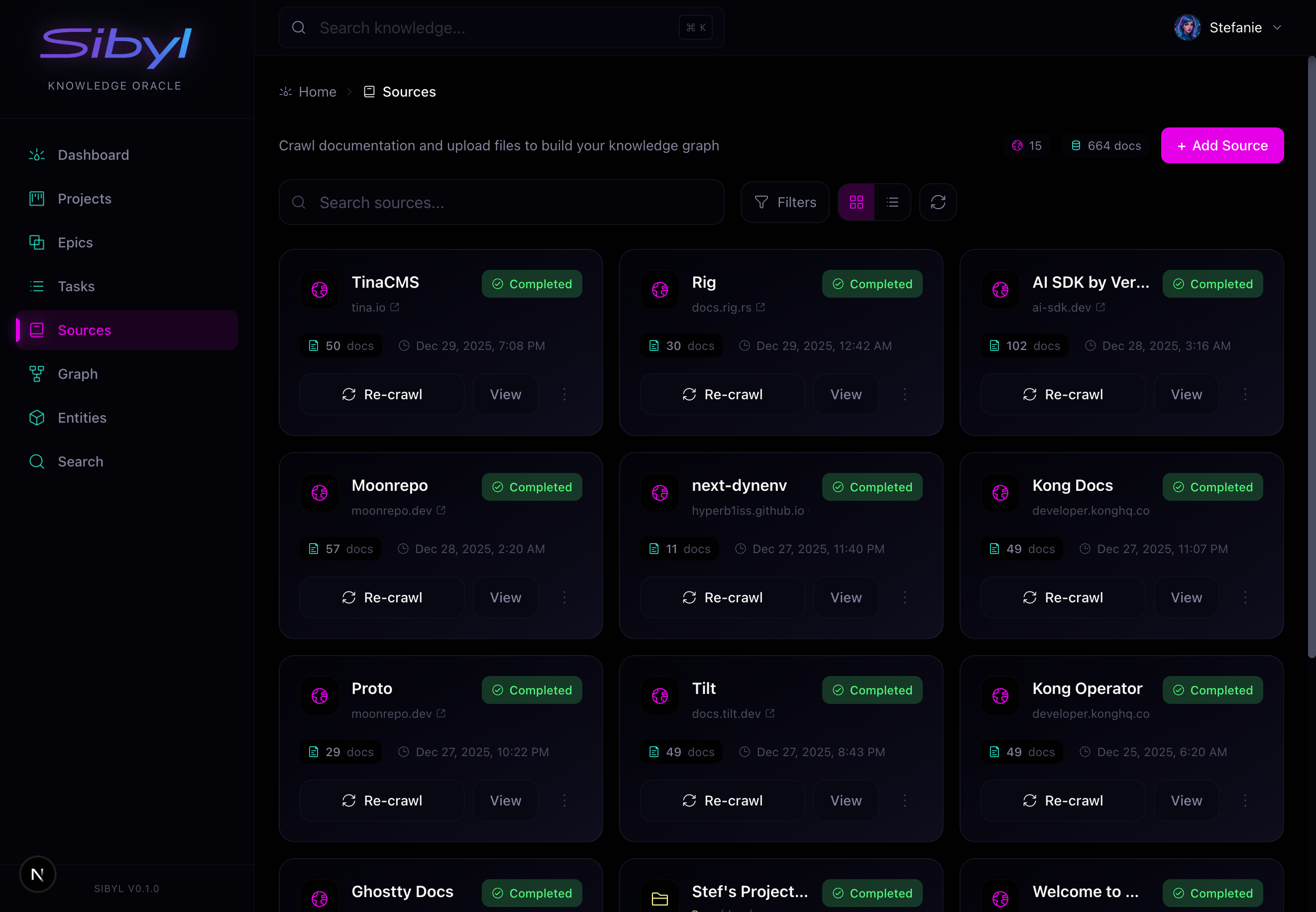
Navigate to Sources in the web UI to:
- Add new documentation sources
- View crawl status and progress
- Trigger manual crawls
- See document counts per source
Via MCP
add(
    title="React Documentation",
    content="https://react.dev/reference/react",
    entity_type="source",
    metadata={
        "url": "https://react.dev/reference/react",
        "crawl_depth": 2
    }
)
Crawling Process
When you add a source, Sibyl:
- Fetches the root URL and extracts content
- Discovers linked pages within the domain
- Crawls pages up to the specified depth
- Chunks content into searchable segments
- Embeds each chunk using OpenAI embeddings
- Stores chunks in SurrealDB for semantic search
Crawl Depth
| Depth | Behavior | Best For |
|---|---|---|
| 1 | Root page only | Single reference pages |
| 2 | Root + linked pages | Section of documentation |
| 3+ | Deep crawl | Entire documentation sites |
Crawl Responsibly Higher depths exponentially increase crawl time and storage. Start
with depth 2 and increase only if needed. :::
Crawl Triggers
# Trigger a crawl after adding a source
sibyl crawl ingest source_abc123

# Re-run a crawl when documentation changes
sibyl crawl ingest source_abc123
Document Structure
Crawled content is stored as document entities:
flowchart TD
    S["Source<br/>React Docs"]
    D1["Document<br/>useState Hook"]
    D2["Document<br/>useEffect Hook"]
    S --> D1 & D2
    D1 --> C1["Chunk · what useState is"]
    D1 --> C2["Chunk · updating state"]
    D1 --> C3["Chunk · pitfalls"]
    D2 --> C4["Chunk · running effects"]
    D2 --> C5["Chunk · cleanup"]
Each document chunk includes:
- Content: The actual text
- Embedding: Vector for semantic search
- Metadata: Source URL, title, position
- Source reference: Link to parent source
Searching Documents
Documents are automatically included in search results:
# Search across everything (graph memory + crawled docs)
sibyl context "useState dependency array"

# Search only crawled docs, not graph memory
sibyl context "review useState documentation" --intent review

# Search only graph memory, skip crawled docs
sibyl context "find prior project decisions about useState" --intent review
To narrow a search to one crawled source by name, use the MCP search tool's source_name filter.
Search Result Types
When you search, results come from two places:
| Source | Result Type | Content |
|---|---|---|
| Knowledge Graph | pattern, episode, rule, etc. | Your team's learnings |
| Document Store | document | External documentation |
Results are merged and ranked by semantic relevance.
Managing Sources
List Sources
sibyl crawl listOutput:
ID              Name              URL                               Documents  Last Sync
source_abc123   React Docs        https://react.dev/reference       142        2024-01-15 10:30
source_def456   AWS Lambda        https://docs.aws.amazon.com/...   89         2024-01-14 14:22
source_ghi789   Internal Wiki     https://wiki.company.com/dev      56         2024-01-15 09:00
View Source Details
sibyl crawl show source_abc123Output:
Source: React Docs (source_abc123)
  URL:        https://react.dev/reference/react
  Depth:      2
  Documents:  142
  Last Sync:  2024-01-15 10:30:00

  Status: Ready
  Chunks: 1,247

  Top Documents:
  - useState Hook (24 chunks)
  - useEffect Hook (31 chunks)
  - useContext Hook (18 chunks)
Change Source Settings
Adjust crawl settings by deleting and re-adding the source with the new options, or use the web UI to edit the source interactively.
Delete Source
# Remove source and all its documents
sibyl crawl delete source_abc123
Destructive Operation Deleting a source removes all associated documents and chunks. This
cannot be undone. :::
Graph Linking
After documents are crawled, you can link them to your knowledge graph:
# Link document chunks to related entities
sibyl crawl link-graph source_abc123
This creates DOCUMENTED_IN relationships between your patterns/episodes and relevant documentation chunks. For example:
- Your "OAuth token refresh" pattern links to AWS Cognito docs
- Your "Redis connection pooling" episode links to Redis documentation
Check Linking Status
sibyl crawl link-statusSource Import
Crawling pulls documentation from the web. Source import is the other ingestion path: it brings structured external records into raw memory through an adapter.
The first shipped adapter is the mailbox adapter, which ingests an mbox archive. Each message becomes a source record with its headers, body, and attachments captured and privacy-classified. Other adapters follow the same contract.
Source import jobs are resumable. Each job checkpoints its progress, so a large archive can be ingested across multiple runs without re-processing records that already landed.
The memory workspace tracks import jobs at /memory/imports, showing checkpoint progress and the records each source produced. Imported records are raw memory, scoped like every other memory and ready for reflection and recall.
Configure where importable archives live with the SIBYL_SOURCE_IMPORT_DIR environment variable.
Best Practices
Choose Sources Wisely
Good sources:
- Official framework documentation
- API references you use frequently
- Internal wikis with tribal knowledge
- Frequently-referenced guides
Avoid:
- General content (blogs, news)
- Massive documentation sites (start with specific sections)
- Frequently-changing content (requires constant re-sync)
Keep Sources Updated
Documentation changes. Re-run crawls when your sources update:
# Re-crawl when you know docs changed
sibyl crawl ingest source_abc123
Use Meaningful Names
# Good
sibyl crawl add "https://react.dev/reference" --name "React 19 Reference"

# Less good
sibyl crawl add "https://react.dev/reference" --name "docs"
Monitor Crawl Health
Check the Sources page in the web UI regularly. Look for:
- Sources stuck in "crawling" state
- Sources with zero documents
- Large time gaps since last sync
Web UI Source Management
The Sources page shows:
- All sources with document counts and sync status
- Crawl progress for active crawls
- Quick actions to crawl, edit, or delete sources
- Document browser to explore crawled content
Adding a Source via UI
- Click Add Source
- Enter the URL and name
- Set crawl depth (start with 2)
- Click Start Crawl
Monitoring Crawls
Active crawls show:
- Progress percentage
- Pages discovered vs crawled
- Current URL being processed
- Estimated time remaining
Troubleshooting
Source Stuck Crawling
# Check crawl status
sibyl crawl status source_abc123

# If stuck, restart the local dev stack
moon run stop && moon run dev
No Documents After Crawl
Possible causes:
- JavaScript-rendered content (Sibyl needs static HTML)
- Robots.txt blocking
- Rate limiting by the source
- Network issues during crawl
Search Not Finding Documents
# Verify documents exist
sibyl crawl show source_abc123

# Check embeddings are generated
sibyl stats

# Try direct document search
sibyl crawl documents list --source source_abc123
Next Steps
- Memory Workspace. Track import jobs in the web UI
- Semantic Search. Search across documents and knowledge
- Entity Types. Understand document vs other types
- Capturing Knowledge. Add your own learnings