Studio architecture
Developer view of Studio: StudioContext, shared-vs-local state, the reused LayerPanel and LayoutWorkspace contracts, and optimistic concurrency.
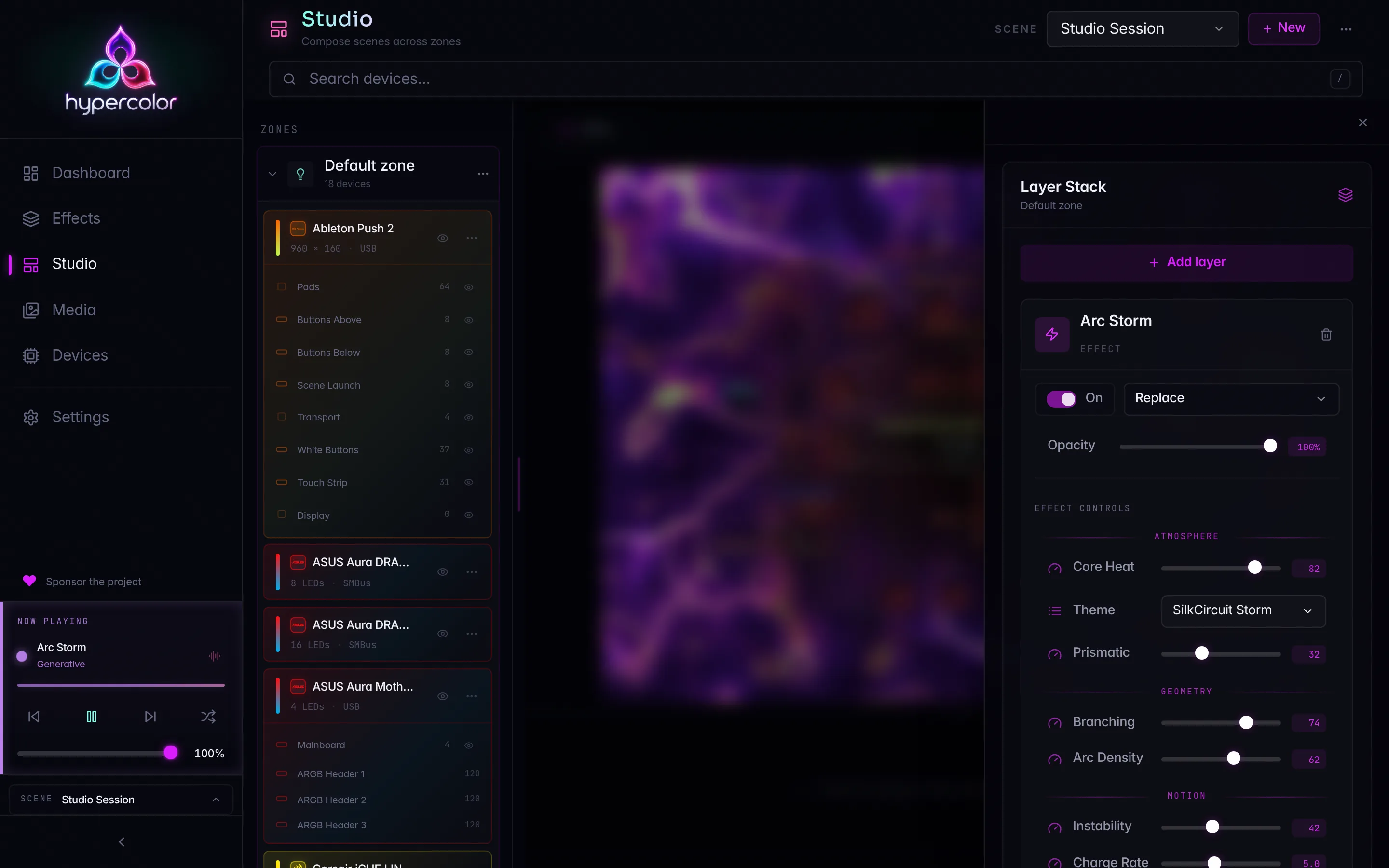
Studio is a two-column Leptos workspace built from shared app-wide state plus a thin layer of page-local UI state. This page maps that split for developers working in crates/hypercolor-ui/: which context owns which signal, how the reused LayerPanel and LayoutWorkspace contracts mount, and how structural mutations use the live scene revision so concurrent edits never clobber each other.
If you want the runtime wire protocol and the daemon REST surface behind these contracts, read the zone API and concurrency page next. For the user-facing tour, start at the Studio overview.
This is a developer reference. The canonical wire type is hypercolor_types::api::scene::SceneDocument. The UI stores that document directly in its shared scene memo. Local surface helpers derive presentation state without creating another REST contract.
#The state map
Studio reads from three app-root contexts and owns one of its own. The rule of thumb: anything that must survive navigation, stay fresh across clients, or be addressable from another page lives at the app root; anything that is purely Studio’s view of the moment lives in StudioContext or in a provider scoped to the Stage.
| Context | Defined in | Lifetime | Owns |
|---|---|---|---|
ZonesContext | zones.rs | App root | The shared active scene, the zone lists, the focused zone |
ScenesContext | zones.rs | App root | The scene library, switching/activation state |
EffectsContext | app.rs | App root | The apply-target, per-zone effect state, active-effect signals |
StudioContext | pages/studio/mod.rs | Studio page | Surface selection, slide-over state, rail highlight + hidden-output UI state |
LayoutEditorContext / ZoneCanvasActions | components/layout_builder.rs | The Stage | The in-flight SpatialLayout, selection, undo history, save/revert |
#Shared state at the app root
The live scene is one resource for the whole app. api::fetch_active_scene reads the canonical SceneDocument from GET /api/v1/scene. provide_scene_contexts() in zones.rs exposes that document as one shared memo on both ZonesContext and ScenesContext. Derived memos build surface lists and presentation state from the same document and its single revision.
WebSocket scene events are freshness hints for the REST snapshot. Structural scene events refetch GET /scene; control-only events do not force a whole-document fetch at slider frequency. EffectControlChanged identifies the affected zone and real layer for consumers that update control state directly. daemon_resource also reads connection_generation, so a socket reconnect performs a fresh REST read instead of assuming missed events will be replayed.
Because the scene projection is shared and WebSocket-fresh, a structural change made from another page, another client, or the CLI lands in Studio with no page-local scene resource. There are no Studio-local active-scene snapshots to drift from GET /scene.
ZonesContext derives the rest with memos, not derives, so a refetch returning identical state does not wake every zone-aware surface in the app:
zones: every surface of the active scene in scene order (LED zones and display Screens).led_zones: LED-role zones only; what effect application targets.multi_zone: whetherled_zone_count(&scene.zones) > 1. This is the trigger for every per-zone affordance.focused_zone: RwSignal<Option<String>>: the zone that quick-applies and the controls panel target.Nonemeans the primary zone.
#EffectsContext and the apply-target
EffectsContext (app.rs) is the cross-page composition seam. Its apply_target: RwSignal<ApplyTarget> is what makes a quick-apply from the dashboard, sidebar command palette, or shell land in the zone you are composing in Studio.
ApplyTarget (apply_target.rs) is a three-variant enum:
pub enum ApplyTarget {
    Primary,
    Zone(String),
    AllZones,
}
It defaults to Primary. Studio’s selection effect writes it from the selected LED zone, so a quick-apply always has a visible, defined target. A Screen or the synthetic Unassigned entry is not an apply target, so when one of those is selected Studio falls back to Primary:
if let Some(zone_id) = selected_led_zone {
    zones_ctx.focused_zone.set(Some(zone_id.clone()));
    effects_ctx.apply_target.set(ApplyTarget::Zone(zone_id));
} else if matches!(/* a stale Zone(target) no longer in the scene */) {
    zones_ctx.focused_zone.set(None);
    effects_ctx.apply_target.set(ApplyTarget::Primary);
}#StudioContext: the page-local view
StudioContext (pages/studio/mod.rs) holds what is specifically Studio’s, provided once from StudioPage so both columns read one source of truth. The shared active scene is re-exposed here as active_scene for convenience, but everything else is page-local:
| Field | Type | Purpose |
|---|---|---|
selected_surface_id | RwSignal<Option<String>> | The selected surface; the single selection source the tree owns and the Stage reads |
active_scene | Signal<Option<SceneDocument>> | Re-exposed shared active-scene document |
refresh_scene | Callback<()> | Re-fetch the shared active scene after a zone mutation |
composition_open | RwSignal<bool> | Whether the composition slide-over (effect and layer editing) is open |
hidden_outputs | RwSignal<HashMap<String, HashSet<String>>> | Per-(scene, zone) hidden-output sets, client UI state only |
selected_output_ids | RwSignal<HashSet<String>> | Rail click selection bridged into the canvas |
hovered_output_ids | RwSignal<HashSet<String>> | Rail hover highlight bridged into the canvas |
attachment_cache | RwSignal<HashMap<String, Vec<ComponentBindingSummary>>> | Per-device component-binding cache the cards fill lazily |
device_search | Signal<String> | Header search term, filters the tree’s device rows |
render_canvas_size | Memo<(u32, u32)> | The daemon’s render canvas extent, read by anything fitting a footprint to the canvas |
rail_disclosure | RwSignal<Option<String>> | The single open-disclosure slot shared by the zone menu, the device kebab, and the add-device picker |
zone_rename_draft | RwSignal<Option<(String, String)>> | An in-flight zone rename as (zone id, draft text) |
pointer_output_id | RwSignal<Option<String>> | The canvas box under the pointer, mirrored back so the rail can highlight the owning card |
rail_disclosure and zone_rename_draft exist because the rail rebuilds on every scene event and every search keystroke. Disclosure state and in-flight text have to outlive the DOM that renders them, or a menu snaps shut and a half-typed name vanishes mid-edit. One shared disclosure slot also means opening a menu closes the previous one.
Two more details are easy to get wrong. The hidden-output state is keyed (scene_id, zone_id) through hidden_outputs_storage_key and persisted to localStorage. It is purely client UI state and is never mirrored to the daemon’s layout_auto_exclusions, which is discovery-reconciliation memory and a different concept entirely. And the rail highlight signals (selected_output_ids, hovered_output_ids) clear on every surface switch, so a stale highlight from the previous zone never lingers on the new one.
#How selection drives everything
Surface selection is the spine of the page. selected_surface_id lives in StudioContext, the zone tree writes it, and three effects in StudioPage react to it.
flowchart TD
    A[active_scene memo] --> B[Selection-guard effect]
    B --> C[selected_surface_id]
    C --> D[apply-target effect]
    C --> E[layers_resource]
    C --> F[ZoneLayoutProvider zone_signature]
    D --> G[EffectsContext.apply_target + focused_zone]
    E --> H[LayerPanel in the slide-over]
    F --> I[Stage canvas]
The selection-guard effect keeps selected_surface_id pointing at a still-present surface. When the live scene changes it defaults to the first non-Display zone, so Studio always opens on a Light:
let next = scene
    .zones
    .iter()
    .find(|zone| zone.role != ZoneRole::Display)
    .or_else(|| scene.zones.first())
    .map(|zone| zone.id.to_string());
selected_surface_id.set(next);
The synthetic Unassigned entry is a special case throughout. UNASSIGNED_SURFACE_ID is the sentinel "__unassigned__", deliberately not a UUID so it never collides with a real zone id. It is “present” only while the scene is genuinely multi-zone, it is not an apply target, and it has no layer stack. layers_resource therefore short-circuits to an empty stack instead of extracting a zone stack from GET /scene.
#The reused contracts
Two pieces of Studio are not Studio’s at all. They are shared singletons mounted with a fixed contract, so the editor for a thing exists exactly once and cannot drift between pages.
#LayerPanel
LayerPanel (components/layer_panel/mod.rs) is the single layer-stack editor. Studio’s composition slide-over is its only mount today; the mount contract keeps it host-agnostic, small, and deliberate:
- Zone identity: the shared active-scene projection plus the selected zone id identify the live stack. Structural routes need the zone id, and layer-specific routes use the real layer id embedded by
GET /scene. - Scene revision:
layers_resourceextracts the selected zone’s stack and the enclosing documentrevision. Structural layer writes may send that value asIf-Match. - One mutation callback:
on_layers_mutated: Callback<()>fires after every applied or rejected mutation; the host refetches the stack and the active scene in response. There is exactly one. - Internal content selection: the asset list and effect-name resolution are owned inside the panel, so it is decoupled from any host page’s selection state.
Studio passes a surface_label, which tells the panel to show the selected surface’s name in its header and drop its own redundant zone selector. The Studio zone tree already owns selection, so that selector would be dead weight.
One display detail worth knowing when you read the code: layers are authored bottom-to-top, but the row list is reversed for display so “Top” reads first. The Top/Bottom stack markers only show with more than one layer.
#LayoutWorkspace and its provider
LayoutWorkspace and LayoutCanvas (components/layout_builder.rs, components/layout_canvas.rs) form the single spatial editor. Studio’s Stage is its only mount.
ZoneLayoutProvider is the ownership seam. Studio’s Stage wraps the editor in this provider, which loads the selected zone’s own Zone.layout and persists it through the per-zone layout API.
<ZoneLayoutProvider
    active_scene=active_scene
    selected_zone_id=selected_surface_id
    refresh_scene=refresh_scene
>
    <Stage />
</ZoneLayoutProvider>
ZoneLayoutProvider provides three contexts down to the Stage:
LayoutEditorContext: the editor’s working state: the in-flightSignal<Option<SpatialLayout>>, selection sets, hover sets, compound depth, theLayoutWriteHandle, andcan_undo/can_redo.LayoutZoneDisplayContext: the per-device attachment profiles resource.ZoneCanvasActions:save,revert,is_dirty, andhas_layout, consumed by the Stage header so the header drives Save and Revert off the same provider state.
The provider reloads the canvas on a zone signature, not on every scene refetch. The signature is the zone id plus its sorted output-id set, so a placement-only change (including this canvas’s own saved edits) leaves the signature unchanged. That is what stops an unrelated scene refetch from clobbering in-flight canvas edits.
The drag and resize hot path is deliberately non-reactive. A single requestAnimationFrame scheduler paints positions directly to cached DOM elements, and the layout signal is written once on mouseup. Live drag preview goes to the daemon over the outbound WebSocket as JSON messages typed zone_layout_preview and zone_layout_preview_clear (sent by send_zone_layout_preview / send_zone_layout_preview_clear in ws/preview.rs), throttled to PREVIEW_PUSH_INTERVAL_MS = 75.0. It is not a REST route and does not touch the global SpatialEngine. See zone API and concurrency for the full hot path.
#Optimistic concurrency
Studio has one optimistic-concurrency token: SceneDocument.revision. Zone, membership, layout, and structural layer mutations may send it in If-Match. A stale structural write returns the canonical 412 response, which the client maps to a Stale outcome before reloading the scene. Control-value patches never send If-Match; they apply in commit order against the real layer id.
#Layer mutations
LayerPanel threads the scene revision through structural layer writes. The outcome type is the discriminator:
match api::update_layer(&zone_id, &layer_id, &request, Some(revision)).await {
    Ok(api::LayerStackOutcome::Applied(_)) => on_layers_mutated.run(()),
    Ok(api::LayerStackOutcome::Stale { .. }) => {
        on_layers_mutated.run(());
        toasts::toast_error("Layer stack changed elsewhere; reloaded");
    }
    Err(error) => toasts::toast_error(&format!("Layer update failed: {error}")),
}
LayerStackOutcome::Stale is a refetch-and-retry signal, not an error and not a clobber. The same pattern covers delete_layer and reorder_layer.
Bulk add-layer carries the same document revision across every target. Each applied structural write returns a projected stack carrying the next revision, which becomes the precondition for the next target. The loop stops on the first stale or failed write.
Live control editing is separate. patch_layer_controls sends PatchControlsRequest to /scene/zones/{zone}/layers/{layer}/controls without a revision header. The layer id comes from the current document; replacing a layer retires that id, so a late control patch cannot land on its replacement.
#Layout saves
ZoneLayoutProvider::save passes the scene revision to api::zones::update_zone_layout(zone_id, layout, revision) and handles ZoneOutcome::Stale the same way: clear the preview, tell the user the scene changed, and refetch. The wire target is PUT /scene/zones/{zone}/layout.
The save updates member placements while the daemon preserves member identity and topology. Membership changes use /scene/zones/{zone}/members, not the layout write. Full route semantics are on the zone API and concurrency page.
#Capability gating
Multi-zone affordances do not probe. They gate on named capabilities the daemon advertises in GET /api/v1/system under status.capabilities, exposed through CapabilitiesContext (app.rs). An absent advertisement means the affordance stays hidden, with no fallback.
pub fn zone_crud_ready(&self) -> bool {
    self.has("zone-crud")
        && self.has("multi-zone-sampling")
        && self.has("zone-device-assignment")
}
+ New zone and the zone rows need all three, because a user who can create a zone but cannot render it or move outputs into it would have an unusable zone. The unassigned-lights policy editor gates separately on scene-unassigned-behavior-write.
#Where to read next
- Zone API and concurrency: the REST routes, the WebSocket preview protocol, and the full
If-Matchstory. - Vocabulary and naming: the locked type names and the never-rooms rule.
- Render pipeline: how the composited canvas becomes LED color downstream of Studio.