Studio
The creative workspace: compose your whole rig with the Scene, Zone, Layers, and Layout model.
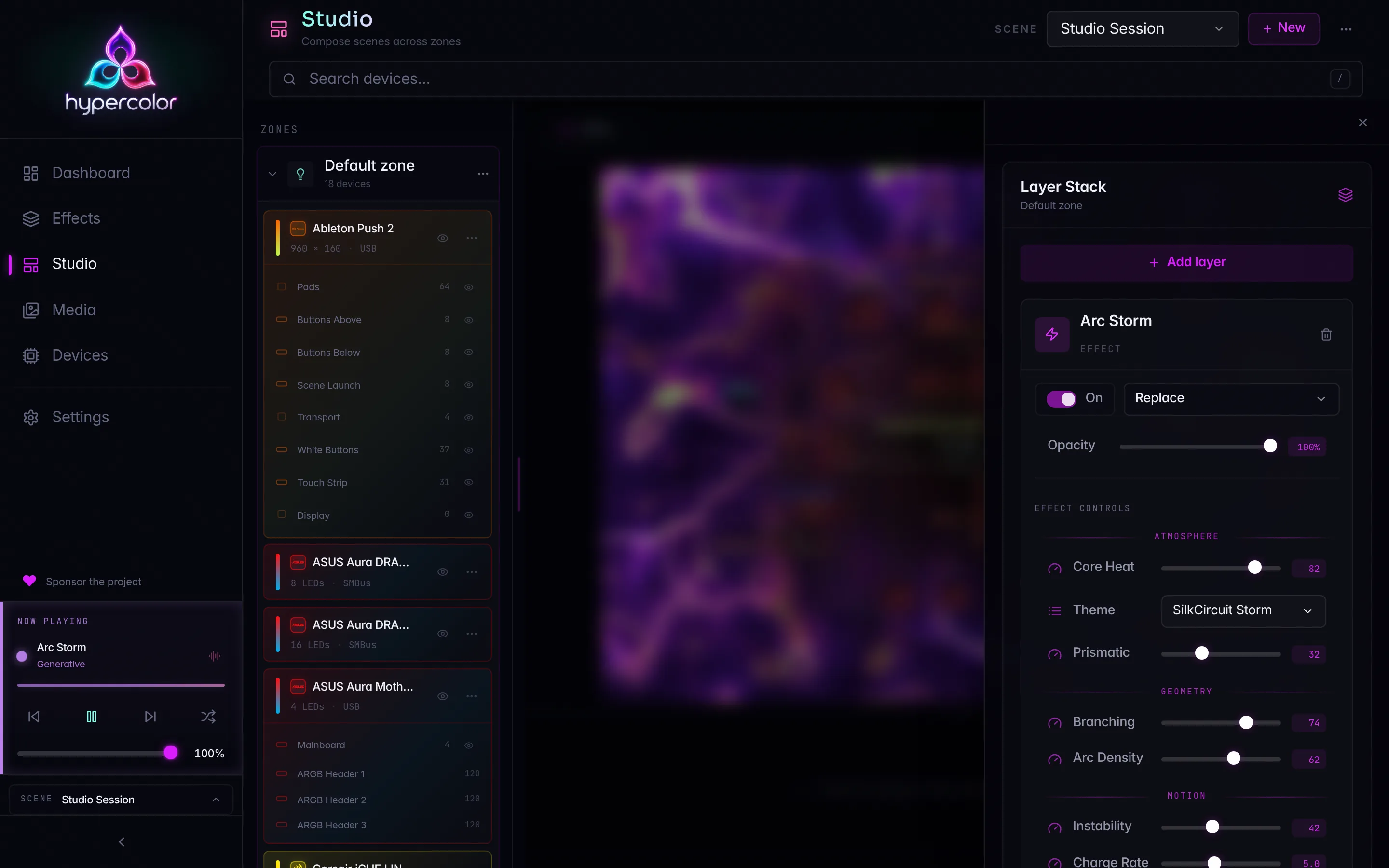
Studio is where you compose your whole rig. It is the web UI’s creative workspace at /studio: pick a scene, partition your hardware into zones, arrange each zone’s devices on its own spatial canvas, stack layers of effects and media, and watch every change render live.
#The model 🔮
Four nouns compose everything in Studio. Learn these once and the whole workspace clicks into place.
- Scene: a whole-rig configuration. Exactly one scene is active at a time, and it owns everything below it. Switching scenes reconfigures your entire setup at once.
- Zone: a flexible partition of a scene. Each zone is its own switchable unit with its own devices, its own layers, and its own layout. A single-zone scene has just the Default zone; a multi-zone scene splits devices across several.
- Layers: a zone’s inputs, stacked. An effect under a gif, a screen capture, a solid color: each is a layer with its own blend mode, opacity, and transform.
- Layout: a zone’s own spatial canvas. You place each device output on it, and Studio samples the composited pixels onto your LEDs.
Scene  ── one active config. Owns everything.
 └─ Zone  ── a switchable partition of the scene
     ├─ Layers  ── effects, media, screen capture, color
     └─ Layout  ── the zone's spatial canvas
         └─ Output ── one device output, placed on the canvas
Scenes are whole-rig configs; zones are how you carve that rig into parts. For the precise vocabulary, including the internal Rust type names, see Vocabulary and naming.
#The workspace
Studio is a two-column workspace. The zone tree on the left lists your zones and screens; selecting one drives the center Stage. For a lighting zone the Stage is the live spatial layout editor, with the effect rendering under the device boxes in real time. The composition panel for editing layers slides in over the Stage on demand rather than taking a permanent rail.
Studio shares one app-wide active scene, so a zone change you make from the dashboard, another client, or the CLI lands here without a refresh. The zone you have selected in Studio is also the app-wide effect apply-target: a quick-apply from anywhere drops into the zone you are composing.
#Start here
New to Studio? Walk these pages in order.
- Overview: the Scene to Zone to Layers-plus-Layout model in full, and how it composes.
- Workspace tour: a guided pass over the page header, zone tree, Stage, and the composition slide-over.
- Scenes: switch, create, rename, and delete scenes; the ephemeral default scene; the apply-target relationship.
- Zones: create, color, enable, and delete zones; single- versus multi-zone behavior; the Unassigned entry.
#Compose your rig
- Device assignment: add and move devices between zones, read the device card, and assign at output granularity.
- Layers: build the layer stack: blend modes, opacity, transform and color, reorder, and per-layer health.
- Layouts: the spatial canvas: drag, resize, and rotate outputs, with compound selection, undo, and live preview.
- Effects and controls: apply effects to a zone and drive the live control panel inside a layer.
- Multi-zone walkthrough: end to end: build a second zone, split devices, and run different effects side by side.
- Now playing and transport: the now-playing chip, per-zone sidebar rows, and pause/resume.
#Under the hood
For contributors working on Studio itself:
- Architecture:
StudioContext, the shared-versus-local state map, and the reusedLayerPanelandLayoutWorkspacecontracts. - Zone API and concurrency: the zone, scene, layer, and layout routes, the
If-Matchrevision preconditions, and the per-zone WebSocket preview protocol. - Vocabulary and naming: the locked vocabulary, the kill list, and the plain-words rendering rules.
#Related sections
Studio applies effects but does not build them. To author your own, head to the Effects section. For the underlying REST and WebSocket contracts, see the API reference. If a zone is not rendering as expected, Studio troubleshooting has the common fixes.
In this section
Studio overview
What Studio is: the scene-to-zone-to-layers-plus-layout model and the two-column composition workspace.
Workspace tour
Guided tour of every Studio surface: the header and scene selector, the zone tree, the Stage, the composition slide-over, and the narrow-viewport drawer.
Scenes
Scenes are whole-rig configurations. Switch, create, rename, and delete them, and learn how the ephemeral default scene and the apply-target fit together.
Zones
Zones are flexible canvas partitions: create, rename, color, enable, and delete them, plus the Default zone and the Unassigned entry.
Device assignment
Add and move devices between Studio zones, read the device card, and hide, identify, move, or remove a placed device.
Layers
The per-zone layer stack: add effect/face/media layers, 11 blend modes, opacity, transform & color, reorder, and the health pill.
Layouts
Map each zone's devices onto the canvas: drag, resize, and rotate device outputs, then save. No layout means no light.
Effects & controls
Apply effects to a zone and tune the live control panel inside a layer: debounced patching, media playback, and screen-reactive controls.
Multi-zone walkthrough
Build a second zone, split devices, run different effects per zone, switch between zones, and set the unassigned-lights policy.
Now playing & transport
The now-playing chip, per-zone sidebar rows with pause/resume, preview-cabinet chips, and overflow to Studio.
Studio architecture
Developer view of Studio: StudioContext, shared-vs-local state, the reused LayerPanel and LayoutWorkspace contracts, and optimistic concurrency.
Zone API & concurrency
The live scene tree, real zone and layer identity, one revision token, and the per-zone WebSocket preview protocol.
Vocabulary & naming
The locked Studio vocabulary, the kill list (never 'rooms' or 'All Lights'), the plain-words rendering rules, and how each wire surface spells the concept.