SMBus / I²C
ASUS Aura lighting over SMBus on Linux and Windows: /dev/i2c-* access, the i2c-dev kernel module, the DRAM remap hub at 0x77, and the permission story.
ASUS Aura motherboard headers, GPU lighting zones, and RGB DRAM all communicate over SMBus, a low-speed I²C-compatible serial bus built into the platform chipset. Linux exposes each adapter as a /dev/i2c-* character device. Hypercolor opens those nodes directly and speaks the ENE indirect-register protocol that ASUS Aura controllers expect.
On Linux the setup requires two things that USB devices do not: the i2c-dev kernel module must be loaded, and the udev rules must be installed. Once those are in place, discovery is automatic. Both prerequisites are Linux-only; the Windows section below covers the PawnIO path.
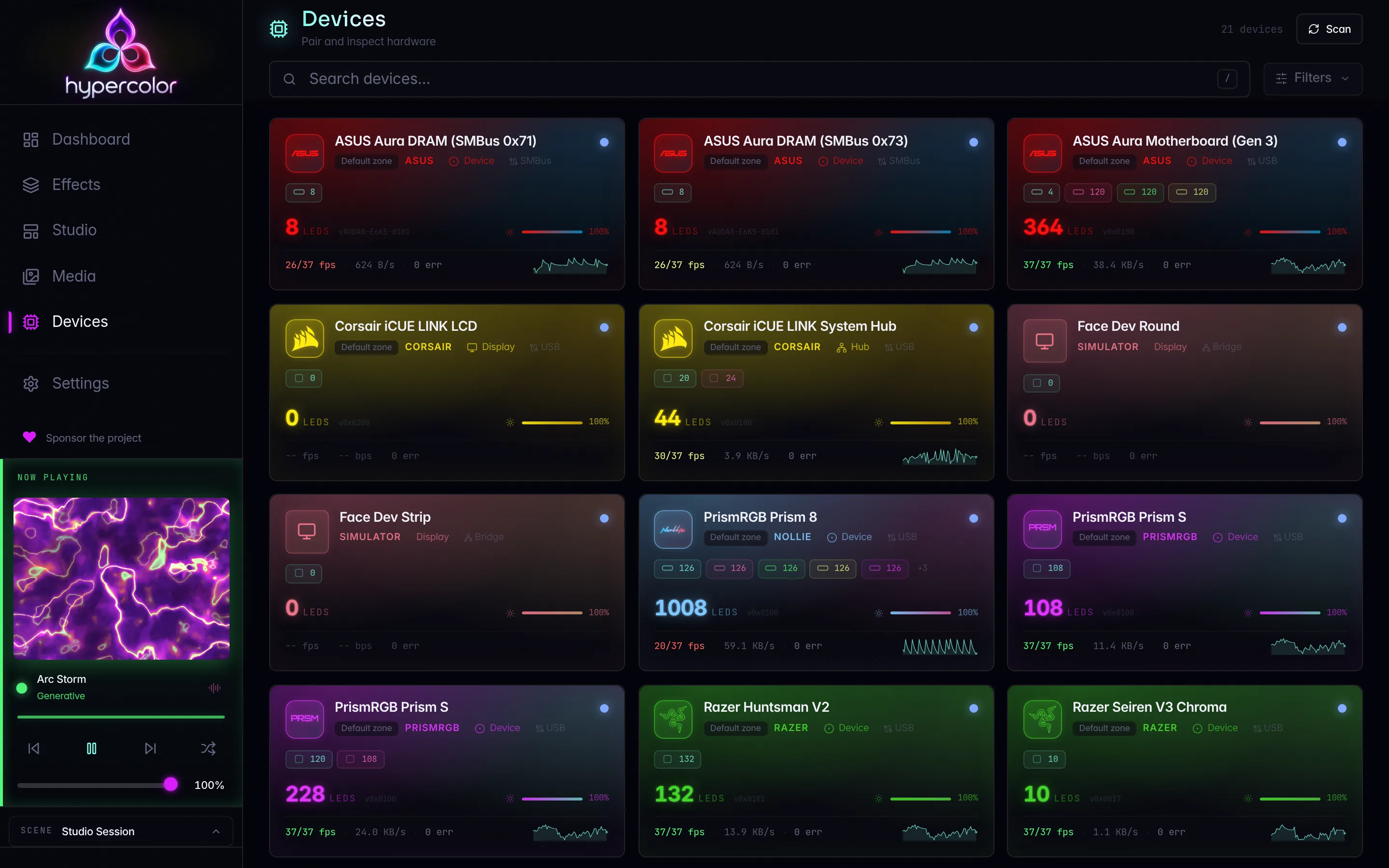
#What devices use this path
Three classes of ASUS Aura controller are discovered over SMBus:
| Controller kind | Probed addresses | Bus selection |
|---|---|---|
| Motherboard | 0x40, 0x4E, 0x4F | Intel and AMD chipset SMBus adapters |
| GPU (Linux only) | 0x29, 0x2A, 0x67 | AMD (0x1002) and NVIDIA (0x10DE) GPU adapters |
| DRAM | Address pool via remap hub | Chipset SMBus adapters (see DRAM section) |
Bus selection is automatic: Hypercolor resolves the PCI vendor and device ID of each adapter from /sys/class/i2c-dev and probes only the address classes that belong on that bus type. Display DDC buses, sensor hubs, and other I²C adapters are skipped.
#Prerequisites
#1. Load the i2c-dev kernel module
The /dev/i2c-* nodes only exist when i2c-dev is loaded. Most distributions do not load it by default.
# Load immediately (until next boot)
sudo modprobe i2c-dev

# Persist across reboots
echo "i2c-dev" | sudo tee /etc/modules-load.d/i2c-dev.conf
Verify the module is active and nodes are present:
lsmod | grep i2c_dev
ls /dev/i2c-*
A typical Intel or AMD desktop board exposes two to five adapters. If no /dev/i2c-* nodes appear after loading the module, the chipset driver may need loading too: for AMD platforms this is i2c-piix4, for Intel it is i2c-i801.
#2. Install the udev rules
Hypercolor ships a udev rule in udev/99-hypercolor.rules that grants non-root access to all I²C bus nodes:
SUBSYSTEM=="i2c-dev", KERNEL=="i2c-[0-9]*", MODE="0660", GROUP="users", TAG+="uaccess"Install it with:
just udev-installThis copies the rules file to /etc/udev/rules.d/, reloads udev, and triggers a re-evaluation for existing nodes. If you have already run just udev-install for USB device access, the SMBus rule is already installed; both USB and SMBus rules live in the same file.
I²C bus nodes are on-chip and cannot be replugged, so a udev trigger is sufficient, no reboot required. If permissions are still denied after running just udev-install, log out and back in so systemd-logind can replay the session ACL.
#3. ACPI resource override (some boards)
On certain Intel and AMD platforms, the ACPI resource manager claims the chipset SMBus adapter and blocks direct access from userspace. The symptom is /dev/i2c-* nodes that exist but return errors on any access attempt.
Add this kernel parameter to your bootloader:
acpi_enforce_resources=laxFor Grub, edit /etc/default/grub, add the parameter to GRUB_CMDLINE_LINUX_DEFAULT, and run sudo grub-mkconfig -o /boot/grub/grub.cfg. This is the same override documented by OpenRGB for ASUS and ASRock boards.
#How discovery works
At startup and during each discovery scan, Hypercolor calls probe_smbus_devices_system(), which iterates every path matching /dev/i2c-* and selects probe targets based on PCI ID:
- Chipset adapters (recognized Intel and AMD SMBus PCI IDs) get motherboard and DRAM probes.
- GPU adapters (AMD GPU or NVIDIA vendor IDs) get GPU controller probes.
- Everything else is skipped with a trace-level log entry.
For each selected address, the probe sequence is:
- Open the bus node at the candidate address.
- Read 16 bytes from ENE register
0x1000(the firmware name string, e.g.AUMA0-E6K5-0106). - Look up the firmware string in the known variant table. Reject the address if no variant matches.
- Read 64 bytes from register
0x1C00(the configuration table). Extract the LED count from the variant-specific offset. - Reject the address if the LED count is zero.
- Accept the controller and register it as a device with firmware version, zone layout, and connection identity
SmBus { bus_path, address }.
A discovered controller appears in the device list as:
ASUS Aura Motherboard (SMBus 0x40)
ASUS Aura GPU (SMBus 0x29)
ASUS Aura DRAM (SMBus 0x71)
with the firmware string (e.g. AUMA0-E6K5-0106) reported as the firmware version.
#DRAM lighting and the remap hub
RGB DRAM is the most complex part of the SMBus path. Aura DIMM controllers share the I²C bus with system memory SPD EEPROMs at 0x50-0x57, and multiple DIMMs may collide at the same default address. Probing the pool directly risks missing sticks or getting garbage responses.
ASUS solves this with a remap hub at address 0x77. When the hub is present, Hypercolor programs it slot by slot before probing, exposing each DIMM at a distinct address:
- Probe whether
0x77responds on the chipset bus. - Snapshot which addresses in the DRAM pool are already occupied (quick-write probe).
- For each DIMM slot (up to 8): write the slot index to ENE register
0x80F8and a free target address to0x80F9via the hub. The target address is shifted left by one bit on the wire. - Probe the occupied and remapped addresses for ENE controllers.
If the hub is absent, Hypercolor falls back to probing the known address pool directly (0x70-0x76, 0x78-0x7F, 0x4F, 0x66, 0x67, 0x39-0x3D) and discovers whatever is already reachable.
DRAM lighting requires the remap hub at 0x77. If another tool holds the hub or the bus during startup, Hypercolor cannot program the slot mappings and may miss some or all DRAM sticks. Stop Aura Sync and OpenRGB before starting the Hypercolor daemon.
#The ENE protocol
The ENE indirect-register protocol is the same across motherboard, GPU, and DRAM controllers. All register access goes through a pair of SMBus registers on the controller’s I²C address:
| SMBus register | Role |
|---|---|
0x00 | Address port: write the 16-bit ENE register here, byte-swapped |
0x01 | Write-data port: single byte |
0x03 | Block-write port: up to 3 bytes per transaction |
0x81 | Read-data port |
A 1ms delay between operations is required and observed. Color data is delivered in RBG wire order (red, blue, green, not RGB) to the firmware’s direct-color register base, which varies by firmware variant:
| Firmware string(s) | Direct-color register | Notes |
|---|---|---|
LED-0116, AUMA0-E8K4-0101 | 0x8000 | Gen 1 Aura |
AUMA0-E6K5-0104/-0105/-0106/-0107/-1107/-1110/-1111/-1113 | 0x8100 | Gen 2 motherboards |
AUMA0-E6K5-0008 | 0x8100 | Gen 2 variant |
DIMM_LED-0102 | 0x8000 | DRAM, requires frame-apply write to 0x802F |
AUDA0-E6K5-0101 | 0x8100 | DRAM with mode-14 |
Controllers are set to direct mode (register 0x8020, value 0x01) during the init sequence. Color frames are pushed at up to 60 FPS. DRAM controllers with a frame_apply_register (currently 0x802F) also require an apply write after each frame.
#Conflicting software
The SMBus is not multiplexed. If Aura Sync, OpenRGB, or any other RGB tool is actively communicating with a controller at the same time as Hypercolor, the transactions interleave at the byte level. The result ranges from wrong colors to controller lock-up requiring a power cycle.
Before starting the Hypercolor daemon with SMBus devices active, stop all other tools that touch the ASUS Aura controllers:
# Check for other processes holding bus nodes
sudo fuser /dev/i2c-*

# Stop OpenRGB if it is running as a user service
systemctl --user stop openrgb

# Or kill by name
pkill openrgb
pkill AuraSyncService
See @/hardware/conflicting-software.md for the full conflict list and isolation steps.
#Windows and macOS
On Windows, SMBus access uses the PawnIO kernel driver and a broker service (hypercolor-windows-pawnio) instead of /dev/i2c-* nodes. Hypercolor calls enumerate_smbus_buses() via PawnIO to list available buses, then runs the same ASUS ENE probe sequence. GPU SMBus probing is not available on Windows. The udev and i2c-dev steps on this page are Linux-only; the installation guide covers installing the PawnIO helper in its Windows section.
macOS has no SMBus path; the transport stub errors there.
#Troubleshooting
No SMBus devices discovered
Check that nodes exist:
ls /dev/i2c-*If nothing appears, load the module (sudo modprobe i2c-dev) and restart the daemon. If nodes exist but discovery finds nothing, enable debug logging:
RUST_LOG=hypercolor_hal=debug just daemonLook for discovered ASUS Aura SMBus controller (success) or skipping ASUS Aura … probe on incompatible i2c adapter (PCI ID not matched). To see the per-bus skip lines, use trace level:
RUST_LOG=hypercolor_hal=trace just daemonPermission denied
Verify the rules file is installed:
ls /etc/udev/rules.d/99-hypercolor.rulesIf missing, run just udev-install. If present, trigger a re-evaluation:
sudo udevadm control --reload-rules
sudo udevadm trigger --subsystem-match=i2c-dev
Then restart the daemon and check that your user is in the users group (groups). On headless systems without an active logind session, the uaccess tag has no effect; use the GROUP="users" fallback instead and ensure your user belongs to that group.
DRAM sticks missing or incomplete
- Run with
RUST_LOG=hypercolor_hal=debugand look fordetected ASUS Aura DRAM remap hubat address0x77. If absent, the hub did not respond and Hypercolor fell back to direct probing. - Check for conflicting tools holding the bus (
sudo fuser /dev/i2c-*). - If the hub is absent and some sticks still collide, a physical slot swap to separate DIMMs onto different buses (where the board supports it) may help.
- On some boards, a full power cycle (not a warm reboot) resets the DIMM controllers to their initial state. Try power-off, wait 10 seconds, then power on.
Firmware string not recognized
If discovery logs ASUS Aura SMBus firmware probe rejected candidate and shows a firmware string that does not match any variant in the table above, file an issue with the string. The variant table in crates/hypercolor-hal/src/drivers/asus/smbus.rs needs a new entry for Hypercolor to drive that controller.
#Quick reference
| Step | Command |
|---|---|
| Load module now | sudo modprobe i2c-dev |
| Persist module | echo "i2c-dev" | sudo tee /etc/modules-load.d/i2c-dev.conf |
| Install udev rules | just udev-install |
| Reload udev | sudo udevadm control --reload-rules && sudo udevadm trigger --subsystem-match=i2c-dev |
| Discover devices | hypercolor devices discover --target smbus |
| List all devices | hypercolor devices list |
| Debug logging | RUST_LOG=hypercolor_hal=debug just daemon |
See also:
- @/hardware/usb-devices.md: USB/HID device access and udev rules overview
- @/hardware/compatibility.md: full device support matrix including ASUS motherboard, GPU, and DRAM SKUs
- @/hardware/conflicting-software.md: stopping Aura Sync, OpenRGB, and other tools before using Hypercolor
- @/troubleshooting/devices-not-found.md: systematic diagnosis when a device does not appear after discovery