Hardware overview
The HAL and transport map; how Hypercolor talks to USB, SMBus, and network devices, and links to each setup flow.
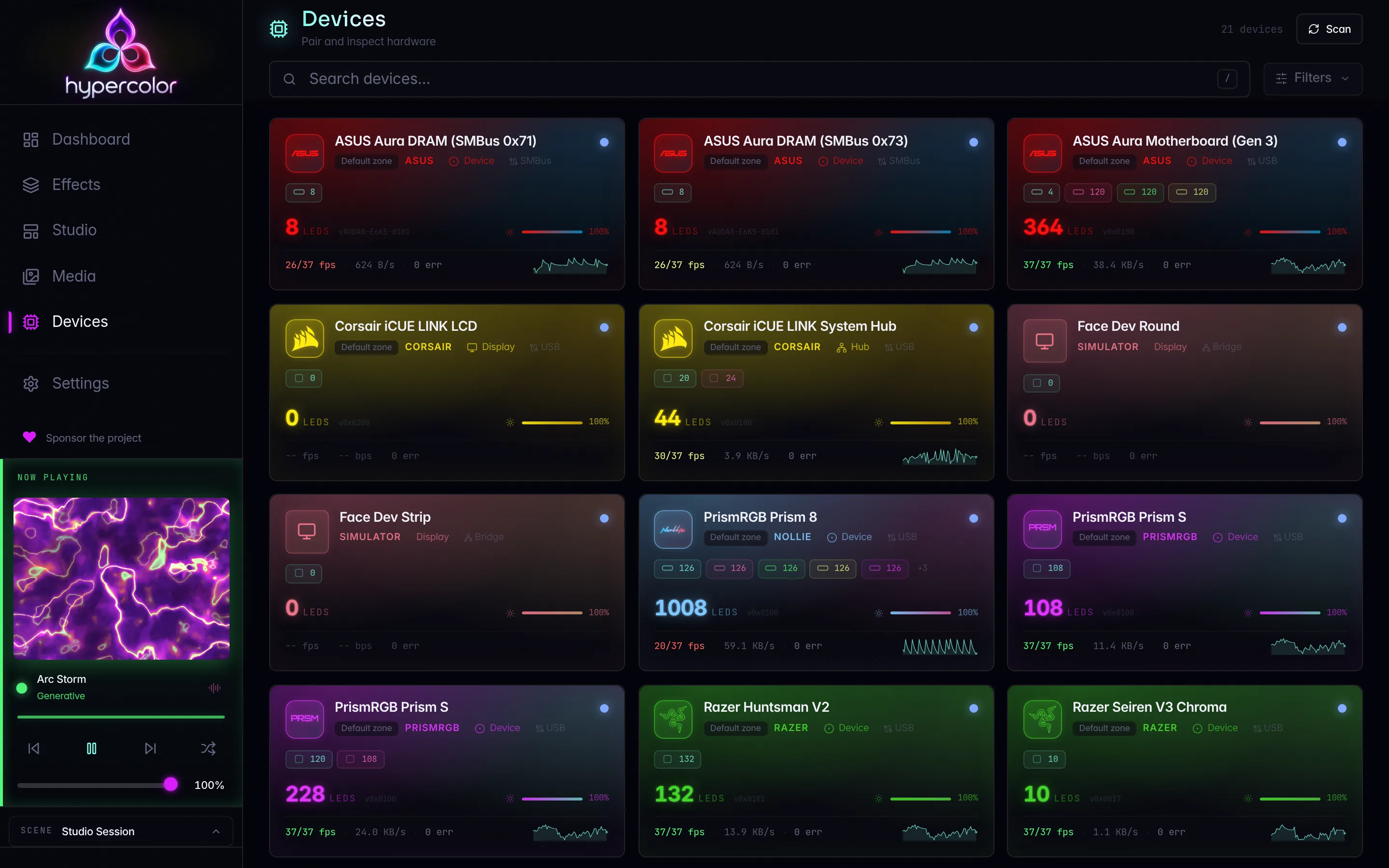
Hypercolor talks to RGB hardware through two parallel systems: a Hardware Abstraction Layer (HAL) for local devices connected over USB or SMBus/I2C, and a set of network driver crates for LAN and cloud-connected devices. Both converge on the same render pipeline, so your effects see one unified canvas and the drivers handle the rest.
This section covers how the transport stack is organized, what device families are supported, and how to get each one working. The compatibility matrix is the authoritative device list; start there if you want to confirm whether your hardware is supported.
#Device categories
#USB and SMBus devices
The hypercolor-hal crate implements protocol encoding for every device that plugs into your machine or sits on the system bus. It exports a Protocol trait (pure encoding, no I/O) and a Transport trait (async byte-level I/O) as separate layers, so the wire format for a Razer keyboard never reaches into network code, and the SMBus probe for an ASUS motherboard never touches USB.
Transport types live in the TransportType enum in hal/src/registry.rs and are the authoritative taxonomy:
| Transport | Used by |
|---|---|
UsbHidApi | Live input devices (keyboards, mice); keeps the OS HID stack attached without claiming the interface |
UsbHidRaw | Linux /dev/hidraw* nodes; direct feature/output reports without claiming the interface |
UsbControl | HID feature reports over USB control transfers |
UsbHid | HID interrupt endpoint transport |
UsbBulk | Bulk-transfer transport with HID feature-report sideband (init/keepalive) |
UsbMidi | Composite: MIDI control + USB bulk display (Ableton Push 2 pad display) |
UsbSerial | CDC-ACM serial (Dygma Defy, currently blocked) |
I2cSmBus | Linux /dev/i2c-* (PawnIO on Windows); ASUS Aura motherboard, GPU, and DRAM lighting |
UsbVendor | Vendor-specific control transfers (Lian Li AL v1.0) |
Getting USB devices working on Linux requires udev rules. Getting SMBus/I2C devices working on Linux requires the i2c-dev kernel module and correct permissions on /dev/i2c-*. These are separate permission paths with separate failure modes. See USB devices and SMBus/I2C for each.
#Network devices
Network drivers live in separate crates behind the hypercolor-driver-api trait boundary. The hypercolor-network crate provides only the registry and orchestration shell; protocol logic belongs to each driver crate. Current network backends:
| Driver | Protocol | Discovery | Notes |
|---|---|---|---|
| Hue | Hue Entertainment API over DTLS | mDNS _hue._tcp.local., then N-UPnP fallback | Requires link-button pairing; DTLS streams on port 2100 |
| Nanoleaf | HTTP pairing + UDP External Control | mDNS _nanoleafapi._tcp.local. | Hold power button 5-7 s to enter pairing mode |
| WLED | DDP (default) or E1.31/sACN | mDNS _wled._tcp.local. | No authentication needed |
| Govee | LAN UDP + optional cloud API | UDP multicast 239.255.255.250:4001 | LAN control must be enabled in the Govee Home app first |
| OpenRGB bridge | OpenRGB SDK over TCP | Connects on demand to the Hypercolor-managed server on 127.0.0.1:6742 | Fallback bridge; drives only hardware no enabled native driver covers; disabled by default |
The ROLI Blocks bridge is a fifth registered driver module, but it speaks to a local blocksd Unix socket rather than the network. Both bridges are covered further down this page.
See network devices for the setup overview, then follow the per-vendor guide for pairing details.
#LCD and display devices
Some hardware carries a small LCD or display panel that Hypercolor can drive alongside its RGB zones. The Corsair LCD modules, Elite Capellix (0x0C39, 0x0C33), iCUE LINK (0x0C4E), Nautilus RS (0x0C55), XC7 RGB Elite (0x0C42), and XD6 Elite (0x0C43), stream 480×480 JPEG frames over USB HID/HIDAPI reports at up to 30 fps. The Ableton Push 2 uses a composite MIDI + bulk transport for its pad-grid lighting and display. These are treated as ordinary device outputs in Hypercolor; effect output is composited from the same canvas as everything else.
#OpenRGB bridge
For hardware that Hypercolor does not yet support natively, the OpenRGB fallback bridge routes frames through an OpenRGB SDK server on 127.0.0.1:6742. Hypercolor runs that server itself (hypercolor openrgb start) against a config directory it owns, with a detector partition that keeps OpenRGB away from every device a native driver drives; a conflict guard output-disables any bridge route that still lands on natively owned silicon. An OpenRGB you start by hand from its own config is a different thing: it detects everything and competes with native drivers, so treat it as conflicting software. hypercolor devices coverage shows which stack owns each device. See OpenRGB fallback for the install matrix, managed server, zone sizes, and the hand-off flow, and My device isn’t supported for hardware neither stack lights.
#Transport architecture
The render pipeline delivers zone colors to the HAL; the HAL turns them into wire-format packets and ships them to the device:
graph TD
    C[SparkleFlinger canvas] --> S[SpatialEngine]
    S -->|per-zone colors| BM[BackendManager]
    BM --> HAL[hypercolor-hal]
    BM --> NET[Network drivers]
    HAL --> USB[USB transports]
    HAL --> SMB[SMBus transport]
    NET --> HUE[Hue DTLS :2100]
    NET --> NL[Nanoleaf UDP :60222]
    NET --> WLED[WLED DDP :4048]
    NET --> GV[Govee LAN UDP :4003]
    NET --> ORG[OpenRGB SDK :6742]
    USB --> Razer[Razer peripherals]
    USB --> Corsair[Corsair devices]
    USB --> ASUS_USB[ASUS USB HID]
    USB --> LianLi[Lian Li hubs]
    USB --> Other[QMK · PrismRGB · Nollie · Push 2]
    SMB --> ASUS_SMB[ASUS motherboard / GPU / DRAM]
Device fingerprints are stable across reconnects: USB devices key on VID/PID plus descriptor heuristics; network devices key on MAC address (WLED: net:wled:<mac>, Govee: net:govee:<mac>) or bridge serial (Hue, Nanoleaf). A DHCP IP change does not lose pairing.
#Supported hardware
The full device list lives in the compatibility matrix, which is generated from data/drivers/vendors/*.toml (32 vendor files). The summary below shows the driver families and their current status.
| Family | Transport | Highlights | Status |
|---|---|---|---|
| Razer | USB HID | Keyboards, mice, mousepads, laptops, headsets | Supported |
| Corsair | USB HID | Peripherals (Bragi + legacy HID), Lighting Node, iCUE LINK hub, LCD modules | Supported |
| ASUS | USB HID + SMBus/I2C | Aura USB peripherals; motherboard/GPU/DRAM Aura over SMBus | Supported |
| Lian Li | USB HID / USB Vendor | Uni Hub (ENE), TL Fan Hub; AL firmware 1.0 uses vendor transport, 1.7 uses HID | Supported |
| PrismRGB | USB HID | Custom chunked protocol; Prism 8 is a Nollie 8 v2 rebrand | Supported |
| Nollie | USB HID | ARGB controllers; distinct from PrismRGB despite overlapping SKUs | Supported |
| QMK | USB HID | Raw HID on any QMK keyboard | Supported |
| Ableton Push 2 | USB MIDI + USB Bulk | Pad/button RGB via MIDI; display via bulk JPEG stream | Supported |
| Philips Hue | Network / DTLS | Entertainment API, gamut mapping, DTLS PSK streaming | Supported |
| Nanoleaf | Network / UDP | mDNS discovery, token pairing, UDP External Control | Supported |
| WLED | Network / UDP | DDP and E1.31/sACN; RGB and RGBW; no authentication | Supported |
| Govee | Network / UDP + Cloud | LAN UDP control; optional cloud API fallback | Supported |
| OpenRGB bridge | Network / TCP | Fallback for any hardware OpenRGB supports | Supported (opt-in) |
| ROLI Blocks bridge | Unix socket / blocksd | Lightpad grids and 24 LUMI key colors | Supported with matching blocksd capabilities (Unix only) |
| Dygma Defy | USB Serial | Driver ready; lighting gated by firmware, not yet enabled | Blocked |
Neither bridge is counted among the 12 driver families with shipping device support. The OpenRGB bridge ships compiled in but its config entry is minted disabled; run hypercolor devices coverage first and enable it per OpenRGB fallback only when a device reads unclaimed or none. The ROLI Blocks bridge scans by default (discovery.blocks_scan = true) and finds devices only when a blocksd socket is present; set discovery.blocks_socket_path if yours is not in the default location. Dygma is the thirteenth family implemented in the tree; it is excluded from the twelve because no Dygma device lights up yet.
If another RGB manager (Aura Sync, openrazer daemon, iCUE via Wine, or an OpenRGB you started yourself) has a USB device open, Hypercolor cannot claim it. The device will appear in lsusb but not in hypercolor devices list. Close or disable the conflicting tool first. The OpenRGB server Hypercolor manages is exempt: it is configured to skip natively owned devices. See conflicting software.
#Device discovery
Hypercolor discovers devices automatically at startup and whenever a rescan is triggered.
USB/SMBus: scans for known VID/PID combinations and probes /dev/i2c-* bus nodes at startup. Hotplug events trigger rescan automatically when the daemon is running.
Network: runs mDNS browsing for each network driver’s service type. Devices can also be added by IP address in the config; the key differs per driver (known_ips for WLED and Govee, bridge_ips for Hue, device_ips for Nanoleaf) for networks where mDNS is blocked across VLANs. See network discovery troubleshooting for the exact snippets.
Trigger a manual scan:
# CLI: filter by target type
hypercolor devices discover
hypercolor devices discover --target wled --target hue

# REST: one scan at a time; concurrent requests return 409
curl -X POST http://localhost:9420/api/v1/devices/discover \
  -H 'Content-Type: application/json' \
  -d '{"targets": ["wled", "hue"], "timeout_ms": 5000}'
If a device does not appear after discovery, see devices not found for a transport-specific diagnosis checklist.
#Setup guides
Each transport path has its own setup page because the failure modes are different:
- USB devices: udev rules, hidraw vs hidapi, replug, hotplug
- SMBus/I2C: ASUS Aura motherboard, GPU, DRAM lighting;
i2c-devmodule;/dev/i2c-*permissions - Network devices: mDNS discovery, known-IP config, pairing overview
- Philips Hue: link-button pairing, DTLS streaming
- Nanoleaf: power-button pairing, panel layout
- WLED: DDP vs E1.31, RGB vs RGBW
- Govee: LAN control setup, Razer-streaming SKUs, cloud API key
- OpenRGB fallback: coverage view, per-platform install, the managed server and detector partition, zone sizes
- My device isn’t supported: native status, unclaimed hardware, the bridge, and a prefilled device-support request
- Device quirks: rebrands, firmware splits, known edge cases
- Conflicting software: openrazer, hand-run OpenRGB, Aura Sync, iCUE
#Adding a driver
Driver modules in hypercolor-hal are organized by silicon/OEM family, not by retail branding. Rebranded SKUs are model-enum variants within an existing driver, not new modules. New USB drivers implement the Protocol trait (pure encoding) and register a DeviceDescriptor with the appropriate TransportType; new network drivers implement the hypercolor-driver-api traits and register with the DriverModuleRegistry.
See adding a driver and adding a network driver for the full implementation checklist and wire-format conventions.
In this section
Compatibility Matrix
Every vendor and device tracked in Hypercolor's driver database, with shipping status.
USB devices
Connect USB/HID/serial/MIDI devices on Linux, Windows, and macOS: udev rules for Linux, transport paths, access errors, and hotplug.
SMBus / I²C
ASUS Aura lighting over SMBus on Linux and Windows: /dev/i2c-* access, the i2c-dev kernel module, the DRAM remap hub at 0x77, and the permission story.
Network devices
How Hypercolor discovers and pairs Wi-Fi and LAN RGB devices: mDNS, known-IP, and manual discovery, plus per-vendor links.
Philips Hue
Connect a Hue Bridge to Hypercolor: N-UPnP and mDNS discovery, link-button pairing, and low-latency DTLS streaming via the Entertainment API.
Nanoleaf
Set up Nanoleaf panels with Hypercolor: mDNS discovery, power-button token pairing, and UDP External Control streaming.
ROLI Blocks
Lightpad grids and LUMI key lighting through the blocksd bridge.
WLED
Connect WLED controllers via mDNS or static IP. DDP streams pixel data on port 4048; E1.31/sACN is available for DMX workflows. No authentication required.
Govee
LAN UDP discovery and control for Govee LED strips, panels, and bulbs. Enable LAN control per-device in the Govee Home app; cloud API key is optional.
OpenRGB fallback
Drive hardware Hypercolor has no native driver for through a Hypercolor-managed OpenRGB server: coverage check, per-platform install, detector partition, zone sizes, and the conflict guard.
My device isn't supported
The ladder for hardware Hypercolor does not light up: confirm native status, read the coverage view, bridge through OpenRGB, then file a device-support request with the facts prefilled.
Device quirks & rebrands
Known rebrands, firmware-split behavior, and devices that appear in the compatibility list but are not yet fully routed.
Conflicting software
Another RGB tool holding a device means Hypercolor gets nothing. Which programs conflict on Linux, Windows, and macOS, and how to detect and resolve it.