Display faces
Build cinematic HTML faces for the LCDs on your rig: pump screens, the Push 2 strip, and virtual simulators.
A face is a full-screen HTML page for a real display on your rig: an AIO pump-screen, the Ableton Push 2 strip, anything the daemon drives as a display surface. Where a canvas effect paints a small canvas that gets sampled onto LEDs, a face owns every pixel of an actual screen, so layout, typography, and motion all matter.
Faces share the SDK, the build pipeline, and the controls model with effects. What changes is the target: a face renders through Servo at the display’s native resolution and composites with the active lighting scene through the GPU display finalize pass. The SDK ships several reference faces under sdk/src/faces/ (system-pulse, now-playing, spectrum, neon-clock, pulse-temp, sensor-grid, silkcircuit-hud) plus a shared atmosphere and component kit. Read those for finished, gate-passing examples.
The SDK is published to npm as hypercolor. New effect and face workspaces pull it from the registry by default. See Setup & workspace for the install path.
#The face contract
A face is declared with face(name, controls, options, setupFn). The setup function runs once and returns the per-frame update function. The context (ctx) carries the display truth; the update arguments carry the live data.
import { face, color, sensor, palette } from 'hypercolor'

export default face('My Face', {
    accent: color('Accent', palette.neonCyan),
    cpuSensor: sensor('CPU Sensor', 'cpu_temp'),
}, {
    description: 'What it does',
    designBasis: { width: 480, height: 480 },  // default basis
    net: true,          // opt into data.net
    lighting: true,     // opt into data.lighting
}, (ctx) => {
    // Setup: build DOM under ctx.container, draw on ctx.ctx (canvas overlay)
    return (time, controls, sensors, audio, data) => {
        // Update: runs every frame at the display's capped fps
    }
})
The update signature is (time, controls, sensors, audio, data). time is seconds (from performance.now()), controls is the resolved control map, and sensors / audio / data are safe-defaulted accessors over the engine’s live state.
The context gives you two drawing surfaces stacked on the display:
| Field | What it is |
|---|---|
ctx.container | full-display DOM <div>; append your elements here |
ctx.canvas / ctx.ctx | a canvas overlay the same size as the container, z-indexed above the DOM, for gauges and graphics |
ctx.width / ctx.height | display size in CSS pixels |
ctx.scale | scale factor from designBasis, computed off min(width, height) so strips keep readable type |
ctx.display | the resolved device truth (see below) |
#Display truth: ctx.display
The daemon injects a descriptor at window.hypercolor.display (versioned, apiVersion: 1, additive-only) describing the physical surface before your code runs. ctx.display resolves it, falling back to viewport measurements when you preview in a normal browser:
| Field | Meaning |
|---|---|
shape | round, square, wide, or tall |
class | pump-lcd, panel, or strip: a device-family layout hint |
circular | physical corner clipping; the SDK masks the container for you with clip-path: circle(50%) |
safeArea | largest unclipped rect; the inscribed square on round panels, the full surface otherwise |
aspect | width over height |
Shape derivation is a pure function: round when the panel is circular; otherwise wide when aspect >= 2.0, tall when aspect <= 0.5, else square. On a round display the safe area is the inscribed square, side = floor(min(w, h) / √2). On a 480×480 round LCD that is 339×339 centered.
Design inside the safe area on round displays. Anything outside the inscribed square is physically cut off by the bezel, even though your canvas extends to the full 480×480.
#The displays that gate every face
Two canonical surfaces define the quality bar. A face ships only when it looks intentional on both, with live data and in its idle state.
| Device family | Resolution | Shape | Class |
|---|---|---|---|
| Corsair LCD (5 SKUs) | 480×480 | round | pump-lcd |
| Ableton Push 2 | 960×160 | wide strip | strip |
A face that is gorgeous on a 480×480 pump screen is a postage stamp on a 960×160 strip if you don’t reflow. Declare per-shape setups; the SDK picks by resolved shape, falling back to the base setup:
{
    variants: {
        wide: (ctx) => buildFace(ctx, true),
    },
},
(ctx) => buildFace(ctx, false)   // base covers round/square/tall
Strip composition rules that survived the two-display gate:
- Go edge to edge. Anchor the hero element left, let atmosphere and rails run the full width like a letterbox frame. Never center a small cluster in a sea of black.
- Key type sizes off
ctx.height, not the design basis, so a strip keeps readable proportions.
#Data sources
Sensors are always available. Everything else is opt-in via face() options, which emit metadata the daemon uses to gate injection. Faces that don’t opt in pay nothing.
| Option | Update argument | Payload |
|---|---|---|
| (always) | sensors | read / normalized / formatted(label) over live system telemetry |
audio: true | audio | mel bands, beat, level: the full analysis frame (see Audio API) |
media: true | data.media | track, artist, album-art data URL, eased positionMs() (MPRIS) |
net: true | data.net | rxBps / txBps / iface at 1 Hz |
lighting: true | data.lighting | scene name, effect names, dominant LED colors |
The reference faces each lean on a different slot: spectrum opts into audio: true, now-playing into media: true, system-pulse into both net: true and lighting: true.
Every accessor is safe-defaulted: no player means data.media.available() is false, not a crash; data.net zeros when no source is injected.
Always design the absent state. An idle card, a breathing glyph, a calm fallback, never a blank screen. The daemon may render your face before any data source is live, and on hardware with no sensors at all.
#Motion that works at 15-30 fps
Faces render through Servo at a capped frame rate. The cap defaults to 30, is set by display.face_fps_cap in config, and is clamped to the 15..=60 range. The device transport limit still wins below the cap. Performance baselines are a product contract: this ceiling is raised or made configurable, never lowered for convenience.
All SDK motion primitives are time-based, so they stay correct at any fps. Drive everything off time deltas, never a fixed per-frame step:
Smoothed(initial, halflife): eased tracking for live values.Transition/transitionOnChange: glide on step changes (controls, presets) with mid-flight retargeting.Spring: organic overshoot, stable under fixed substeps.- The shared atmosphere kit (
sdk/src/faces/shared/atmosphere.ts): nebula fields, rising motes, comet rings and rails, andentrance()for staggered boot choreography.
Design slow and eased. Fast travel strobes at 15 fps; a hard-blinking separator reads as a glitch where a breathing one reads as alive.
#Servo CSS support
Faces render in Servo, not Chrome. The pixel-proven matrix (asserted by servo_css_probe_tests in hypercolor-core):
| Works | Silently ignored |
|---|---|
flexbox (row / column / gap), transforms, clip-path: circle(), aspect-ratio media queries | CSS grid layout |
Aspect-ratio media queries are safe for visual refinements such as switching ornament density between a square face and a wide strip. Keep device class, circular safe areas, and exact geometry driven by ctx.display, since aspect ratio alone does not carry those contracts.
Never structure a layout with CSS grid. Children render stacked full-width with no error and no warning. Use flexbox for everything. Canvas gradients throw on malformed colors, so pass hex or rgba() strings; the SDK’s withAlpha is hex-only, so handle hsl() yourself if you generate it.
#The dev loop
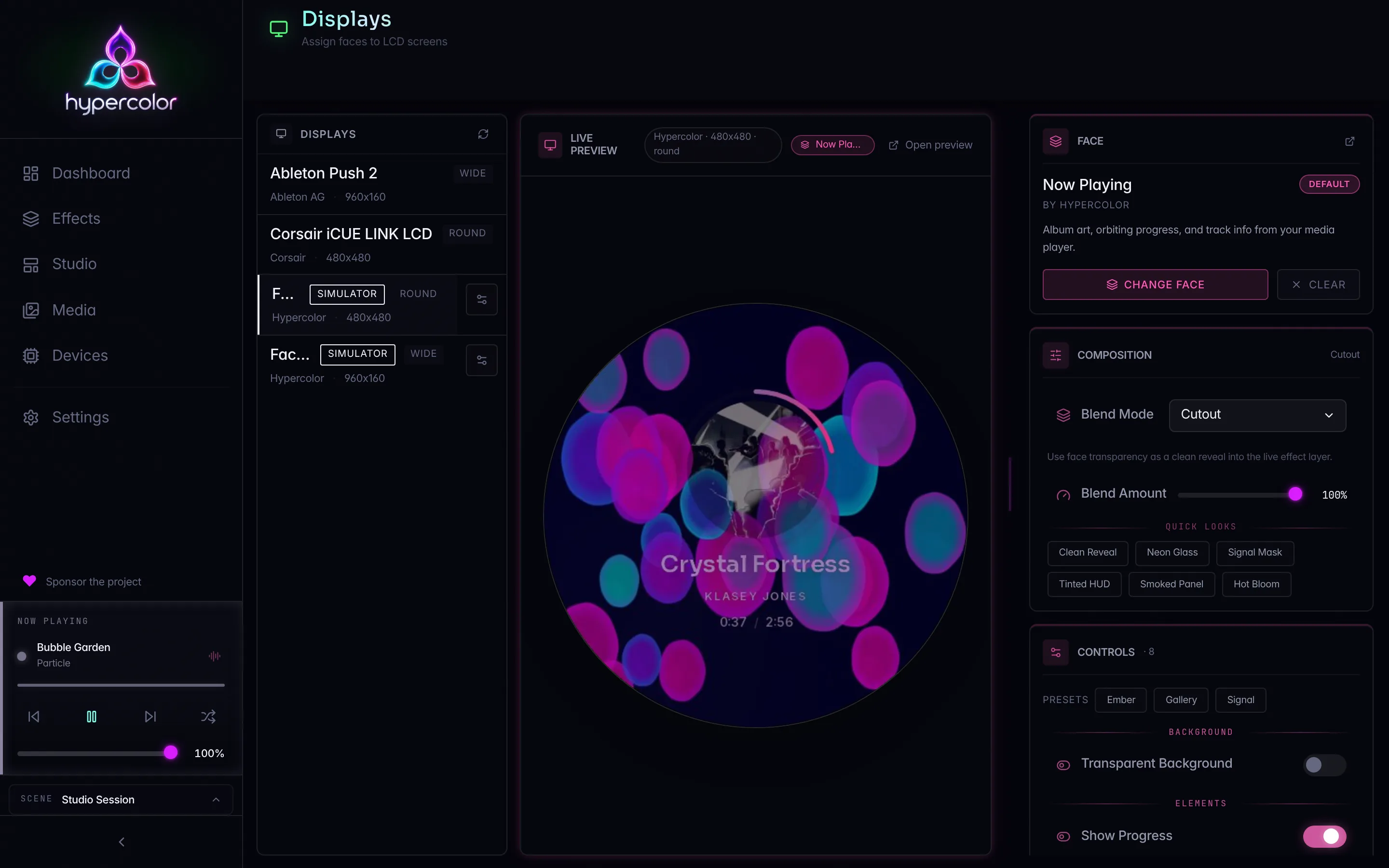
just face-dev system-pulseThis builds the face, installs it into the running daemon, creates two virtual simulator displays (480×480 round and 960×160 strip), assigns the face to both, opens the web UI, and rebuilds on every save. Displays and their simulator previews live on the Devices page. Save the file and watch both previews update. The simulator path means you can author and gate a face with no physical LCD attached.
The quality gate: a face ships when it looks intentional on both canonical displays, round and strip, with live data and in its idle state. Screenshot both, every time.
#Controls and presets
Controls follow the effect controls API exactly (color, num, toggle, combo, sensor, font). Two face-specific conventions:
- Ship presets. A face with four to eight presets, including a minimal “naked” variant, feels designed; a face with bare controls feels like homework. Declare them in
options.presets. - Keep control ids stable across redesigns. Assignments persist control values by id, so renames silently orphan a user’s tweaks.
#Installing and assigning a face
A built face is one self-contained HTML file with its manifest in meta tags: controls, presets, data-source opt-ins, and the format version. Font controls can load selected Google Fonts at runtime unless capture mode disables remote fonts.
just face-build system-pulse            # build to effects/hypercolor/
# install into a running daemon (validates manifest, size, render surface):
curl -F "file=@system-pulse.html" \
  http://localhost:9420/api/v1/effects/install
Re-uploading a file with the same name updates it in place. The effect id is path-derived, so existing display assignments follow the update.
Assigning a built face to a display is a separate step on the daemon’s display API.
/api/v1/displays/{id}/faceAssign or clear an HTML face on a display device. The scope field is "default" (the default) or "scene". A default assignment persists across scene switches; a scene assignment writes the active scene’s display zone, which always wins over the stored default while that scene is active. See the REST reference for the request body and the envelope.
The same operation is exposed to AI agents as the MCP set_display_face tool, with the same default / scene scope parity, in the Agents & MCP section.
#How a face becomes pixels
graph TD
    A[face.html assigned to display] --> B[Servo session at native resolution]
    B --> C[daemon injects window.hypercolor.display]
    C --> D[per-frame update fn draws DOM and canvas]
    D --> E[GPU display finalize: blend with lighting scene]
    E --> F[display device]
Each face gets its own Servo session rendering at the panel’s native resolution, so there are no scaling hacks. The finalize pass blends the face with the active lighting scene through the GPU compositor (circular mask, sRGB-correct, viewport transforms), which is why a face can mirror the rig’s own colors through data.lighting. For the deeper render-path view, see Renderer internals.
#Related
- Setup & workspace: scaffold a face workspace.
- Creating effects: the build, validate, ship loop that faces share.
- Controls reference: the full controls API, including
sensorandfont. - Audio API: the per-frame audio surface an
audio: trueface receives each frame. - Color science for LEDs: gamut and gamma when a face’s dominant colors drive the rig.